Running a good Shopify fashion store in India means strong images without eating into margins. The best Shopify AI apps for Indian fashion brands are not one winner but a few tools that each do one job well. Global apps on the Shopify App Store serve western T-shirts and hoodies well, but complex Indian silhouettes, drape and rupee billing are a different matter. This guide groups the apps by the job they do, lists what is known about each, and gives you a way to test them yourself rather than take anyone's word, including ours.
What jobs do AI apps do for a Shopify fashion store?
It helps to start with jobs, not product names. A fashion store usually needs help with five things, and each is solved by a different kind of tool.
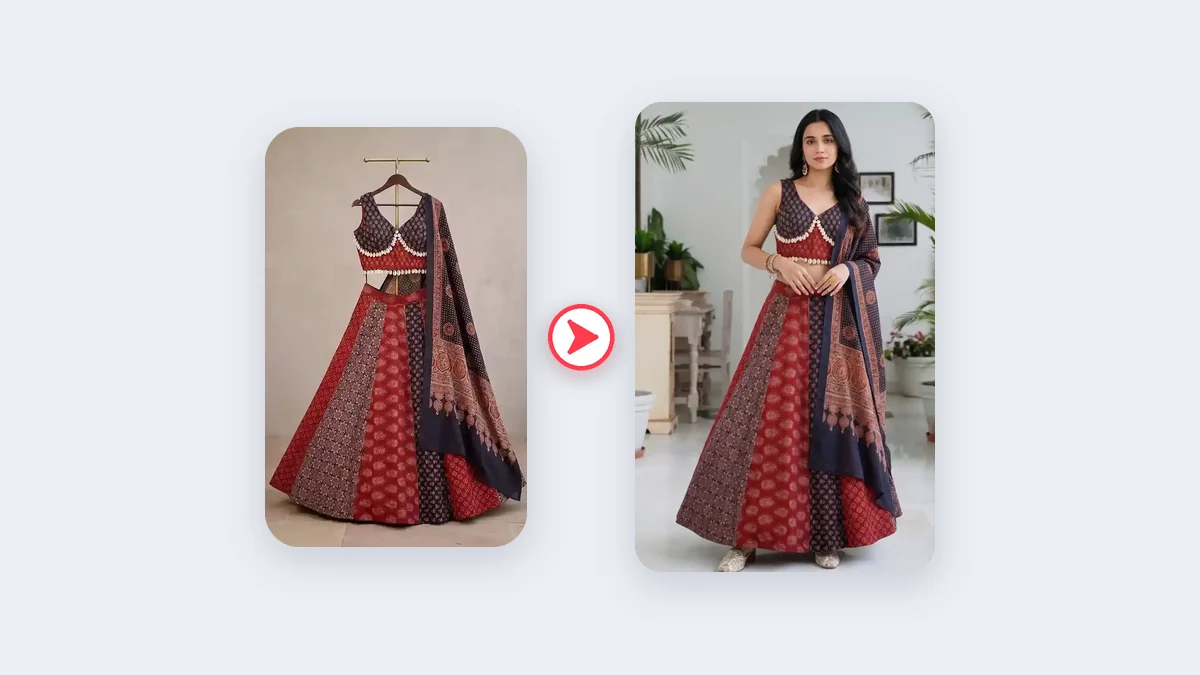
- Product images on a model: showing the garment worn, from one or two photos of the garment.
- Cutouts and clean packshots: removing the background for a plain white or coloured product image.
- Size and fit guidance: size charts and recommendations, which help customers choose the right size.
- Image speed and search: compression, alt text and structured data, so pages load quickly and images are found.
- Social and ad content: turning product photos into short videos or posts.
If you only fix one thing, fix the product image. It is what the customer sees first, and it is the only one of the five that decides whether they look at the size chart at all.
How do the main Shopify AI apps compare?
| App | Primary job | Best for | Price as listed (USD) | Indian ethnic wear |
|---|---|---|---|---|
| Vastralook | On-model catalogue and saree drape studio | Sarees, lehengas, kurtis, suits and western wear | Credit packs and plans: see the pricing page | Built for it: Drape Studio for sarees and lehengas, Catalogue Studio for other garments |
| Photoroom Shopify app | Background removal and cutouts | Clean white packshots and product cutouts | About $12.99 a month | Cutouts only: no draping on a model |
| Kiwi Sizing | Size charts and fit prediction | Cutting size-related returns | Free tier, then about $6.99 a month | Works with any garment's measurements |
| Booster SEO and Image Optimizer | Image compression and alt tags | Faster pages and better indexing | Free tier, then about $39 a month | Technical SEO, independent of garment type |
| Klap or Minta AI | Automatic video and social ads | Turning product photos into Reels or TikTok clips | About $29 a month | Generic video templates |
A note on reading that table: the tools are not direct rivals. Photoroom makes cutouts, Kiwi Sizing deals with sizes, Booster tidies images for speed and search, and Klap or Minta makes video. Only Vastralook, in this list, creates a model wearing your garment.
What should Indian stores check about billing and currency?
USD prices matter for Indian stores. Card payments in another currency may bring foreign-exchange fees from your bank, and an overseas invoice will not always carry your GST details. Check your own card and your accountant's view before you sign up for any tool billed in dollars. Vastralook bills in rupees, adds 18% GST on rupee purchases and lets you add a GSTIN before you pay.
Where does Vastralook fit in a Shopify stack?
Vastralook makes on-model still images. It does not make video, and it is not installed inside Shopify. You work in one of two studios, download the finished shots and add them to your Shopify products the usual way, through the product admin or a bulk import. If you need a storefront integration or bulk export, the Custom plan on the pricing page lists those as features, so ask about them there.
- Drape Studio for sarees and lehengas
Upload one flat photo of the full saree (body and pallu), optionally a blouse piece, set the cut and the pallu line, press Use this cut, pick a model and a background from StyleMuse and choose poses. Then order as Instant or Budget.
- Catalogue Studio for every other garment
Upload garment photos (up to 4 sides each), pick models and styles, check the Summary tab (garments x models x styles = shots) and order. A saree uploaded as a plain photo is not the right path here.
- Download and upload to Shopify
Open the Orders tab, use Download all, and add the images to each product. Export with logo is available on any shot if you want your logo on it.
Pick one aspect ratio and keep it across the whole collection: Catalogue Studio offers 3:4, 4:5, 1:1, 9:16 and 16:9, and a portrait ratio such as 3:4 is a common fit for fashion product pages on mobile. Checkout asks your state and lets you add a GSTIN for a business invoice.
How should you evaluate any Shopify AI app before paying?
Reviews and rankings, including this one, age quickly. A short test with your own products tells you more. Use the same test for every app so the comparison is fair.
- Test on your hardest product: a heavy saree, a flared lehenga, a printed kurti, a dark fabric, a sheer fabric.
- Check the output against the real garment for colour, print placement, neckline, sleeves and trims.
- Look at the billing: which currency, whether it is a subscription or a pack, whether credits expire and whether you get a proper GST invoice.
- Read the refund or credit-back rule for results that miss. Know what happens when a generation fails.
- Look at store speed after install. Some apps add scripts to every page, so run a speed check before and after.
- Check what you can export: file formats, sizes, logo placement and whether you can use the images across your channels.
- Check support: whether there is a person to ask, and how quickly they answer.
- Check the exit: can you stop paying without losing the images you have already made?
Which stack suits which kind of store?
| Store | Start with | Add later |
|---|---|---|
| New saree or ethnic wear store with a small catalogue | On-model images from a studio built for Indian garments | Size help for stitched pieces, image optimisation |
| Western wear store with simple garments | Cutouts or on-model images, whichever you can test cheaply | Size help, then video for social |
| Large catalogue with frequent drops | A batch-based image studio and an image optimiser | Size help, social content |
| Store with high returns on fit | Size chart and fit tool, plus clearer images | Better model photos with the right body type |
- It handles Indian garments such as sarees with a pallu and a separate blouse piece.
- One batch gives several poses and models per garment, which a cutout app cannot.
- Billing is in rupees with a GST invoice.
- It makes still images only, so you need another tool for video.
- It does not predict sizes. Pair it with a size chart or a fit tool.
- Output varies from the reference, so you need to check every shot.
Free AI garment analysis and AI recommendations in Vastralook
One thing worth checking when you compare tools is what happens before you spend anything. In Vastralook, uploading a saree photo starts a free AI garment analysis: the category, occasion, fabric, colours, design and work are read from your photo, and no credits are used. From that reading it suggests five ready looks, each a model, a background and jewellery chosen together, with a match score. One click fills all three.
That is how a shoot starts from the right choices instead of a blank page, and why the finished shots come out studio-quality and consistent with the garment you uploaded. The analysis and the recommendations are suggestions: you choose, you see your choices before you order, and Vastralook is built to keep them.
Can I upload images made on Vastralook directly to Shopify?
Yes. Download the finished shots from the Orders tab and add them to your products through the Shopify product admin or a bulk import, like any other image files.
Do I need coding skills to use Vastralook with Shopify?
No. You upload a garment photo, pick a model and a style, order and download. There is nothing to install in your store.
Which Shopify AI app is best for Indian ethnic wear?
Pick by job. For on-model images of sarees and lehengas, use a tool that handles the pallu, the border and the blouse. For sizes use a fit tool, and for speed use an image optimiser. Test any tool on your hardest product first.
Will AI apps slow down my Shopify store?
Some apps add scripts or load images through their own servers, which can affect speed. A studio that you use outside Shopify and only download from adds nothing to your pages. Run a speed test before and after installing any app.
Is Vastralook a replacement for Photoroom?
They do different jobs. Photoroom, as listed, removes backgrounds for clean packshots. Vastralook puts the garment on a model. Many stores could use a cutout for some products and an on-model image for others.