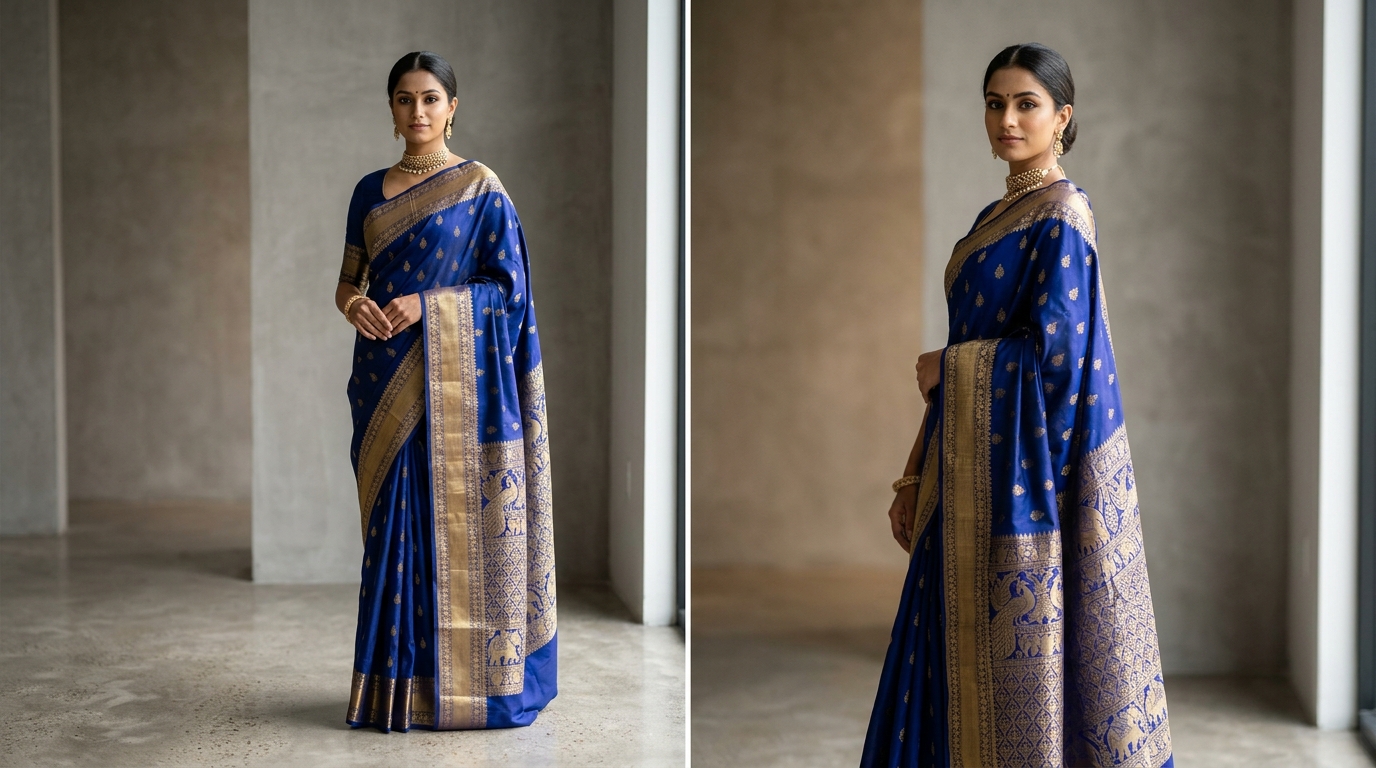
A saree is not a standard garment. Unlike a shirt or kurti with sewn sleeves and fixed armholes, a saree is six yards of unstitched cloth with distinct zones: the pleats, the body, the running borders, and the heavily embellished pallu. When an AI image generator attempts to drape a saree without guidance, it has to guess which part goes where.
In Vastralook's Drape Studio, you have full control over the cloth geometry. If a generated shot doesn't look right, you don't need to scrap the shoot. Here are the five most common draping mistakes and the exact step-by-step fix for each.
Mistake 1: The pallu design lands on the pleats (or on the wrong shoulder)
Symptom: You upload a saree with a rich golden peacock pallu, but in the final model shot, the peacocks are wrapped around the model's knees in the pleats, while the shoulder pallu shows the plain body pattern.
- Why it happens
The AI saw a single rectangular photo and could not tell where the body pattern ends and the decorative pallu begins.
- How to fix it in 30 seconds
Open the AI Cut & Detection Workspace in Drape Studio. Find the Pallu Line tool. Drag the line across the photo to mark the exact boundary where the pallu artwork starts. Then click either 'Pallu at Top' or 'Pallu at Bottom' to match which end of your photo holds the pallu.
Mistake 2: Blouse pattern bleeding into the saree (or vice versa)
Symptom: The blouse pattern shows elements of the saree body, or the saree pleats suddenly display the blouse's contrasting brocade weave.
- Why it happens
When uploading the blouse swatch, the photo included a sliver of the saree fabric in the background. The AI reads every pixel in the blouse slot as part of the blouse design.
- How to fix it
Crop your blouse swatch tightly before uploading. Only the blouse fabric should be visible in the frame. If you do not have a separate blouse photo, leave the Blouse Fabric slot empty — Drape Studio will automatically generate an aesthetically coordinated blouse.
Mistake 3: The zari border looks soft, blurred, or generic
Symptom: The overall saree looks good, but the intricate temple border or zari work appears washed out or has lost its sharp metallic definition.
- Why it happens
In a wide full-saree photo, a 3-inch border represents only a tiny percentage of the total pixels. The AI doesn't have enough high-frequency detail to render the exact weave.
- How to fix it
Scroll to Auxiliary Design References in Drape Studio. Upload a straight-on smartphone close-up photo to the 'Lace / Border' slot. This feeds the high-resolution border details directly into the drape engine.
Mistake 4: Pattern repeat warped or stretched sideways
Symptom: An all-over floral butta or geometric print looks squashed or stretched diagonally across the pleats.
- Why it happens
The fabric was photographed at a slight angle or laid crooked on the floor, so the fabric warp and weft lines run diagonally in the upload.
- How to fix it
In the Cut Workspace, use the 'Rotate' tool or the 'Fine Angle Nudge' button until the weave runs completely horizontal and vertical. Then set the 'Repeat Lines' so the studio knows the exact dimensions of one pattern tile.
Mistake 5: Color mismatch (the shot looks darker or washed out)
Symptom: Your real saree is a vibrant rani pink, but the model shot shows a muted magenta or dusty rose.
- Why it happens
Indoor artificial lights (warm yellow bulbs or cold LED tubes) create heavy colour casts that smartphone cameras auto-correct incorrectly.
- How to fix it
Photograph your fabric in diffuse, indirect daylight (near an open window or shaded balcony). Avoid camera flash or Instagram filters. If a paid shot still misses color fidelity, you can ask for half your credits back from the Orders tab.
| Draping Issue | Primary Cause | Tool to Fix in Drape Studio |
|---|---|---|
| Pallu on pleats | Pallu boundary undefined | Pallu Line marker + Top/Bottom toggle |
| Blouse design on saree | Loose crop on blouse photo | Crop swatch tight, remove saree edge |
| Blurry / softened border | Low pixel resolution on border | Add close-up to Lace / Border slot |
| Distorted pattern repeat | Crooked fabric angle | Fine Angle Nudge + Repeat Lines |
| Color tone inaccuracy | Warm / yellow room lighting | Shoot in daylight or use Color Match reference |
Why do my pleats look slightly different from the cut preview?
The Cut Workspace shows the geometric 2D mapping of your cloth. The final render simulates physical cloth physics and natural gravity, so pleats drape naturally around the model's stance.
Can I recreate a shot if the drape missed?
Yes. Every Standard order includes 1 free Recreate per shot, allowing you to re-render without spending additional credits.
Do I have to set the pallu line for all-over print sarees?
If the saree has no separate pallu and features the exact same print from end to end, you can skip the pallu line and leave the fabric to drape continuously.
How do I get half my credits back if a shot fails?
Open the Orders tab within 7 days of generation, find the shot that missed, and click 'Ask for 50% credits back'. Our review team inspects the input within 24 hours.


