Every clothing seller eventually asks the same question: how do I get good photos of this on a person, for every garment, without spending a fortune? There are four honest answers. This post goes through each of them from a seller's point of view, says where each one is the right call, and then explains what Vastralook was built to solve and why that approach suits a catalogue. It names no other products, because the argument is about approaches, not brands.
The four ways to photograph clothes
A. A traditional studio shoot
You book a model, a photographer and a studio or location. For a saree you also need someone who can drape. For jewellery, hair and makeup you may need a stylist. Then there is editing and retouching. The result is the gold standard when the shoot goes well: real people, real light, real emotion. The cost is time and money for every design, and the more garments you have, the less it scales. A shoot also happens on one day, so the model, the light and the background belong to that day.
B. A general-purpose AI image tool
You type a description, or upload a photo with a description, and the tool invents a picture. It is flexible and fast, and for artwork, moods and ideas it is excellent. For a catalogue it has a structural problem: the picture is invented, so the garment can drift (a different border, a changed print, a colour that is not yours), the model's face changes from one picture to the next, and the camera angle and background are left to chance. When the result is wrong, the fix is more prompts, another try and another payment.
C. A try-on or overlay app
These put a picture of a garment onto a picture of a body. They are quick, and for a fast preview or a social post they can be enough. Because they place a flat garment on a body rather than drape it, they are weakest on the garments where fall matters most: a saree's pleats and pallu, a lehenga's flare, the way a dupatta hangs.
D. Vastralook's three studios
Drape Studio for sarees, Catalogue Studio for every other garment, and Group Studio for group pictures. Each one starts from your own garment photo, lets you choose the model, the pose and the background before you order, shows you what you are ordering, and is built to keep those choices across a batch.
What matters to a clothing seller, side by side
| What matters to you | Studio shoot | General AI tool | Try-on app | Vastralook |
|---|---|---|---|---|
| Starts from my garment photo | Starts from the real garment on a real person | Often starts from words; a photo can be added, but the picture is still invented | Yes, it places your garment photo on a body | Yes. Your garment photo is the reference; we do not invent a new design |
| I choose the model, pose and background before I order, and see them | Yes, agreed in advance, seen on the day | Usually described in words and discovered after the picture is made | Limited choice of bodies and poses | Yes. You pick them first and the summary shows every combination before you pay |
| Same model across a whole collection | Only if you shoot the whole collection at once | Hard; faces and settings drift between pictures | Same body, but not a styled set | Built to keep it. Same Model, Same Set locks the model, pose and scene |
| Saree pallu, pleats and border | Handled by a drape artist, for each saree | The tool has to guess how a saree falls | A flat overlay does not drape | Drape Studio: you mark the cut, the pallu line and the pattern repeat, with a live drape preview |
| Group pictures from approved photos | Needs all the models on one day | Faces are invented, so they may not match your people | Not usually offered | Group Studio: one picture from one finished photo of each person, 2 to 9 |
| Marketplace sizes | Edited afterwards by you or your editor | You crop and resize yourself | You crop and resize yourself | Presets for Myntra, Amazon, Flipkart and Meesho set the background and size |
| Your logo on every shot | Added in editing | Added in editing | Added in editing | Set once; every download can carry it |
| When a shot is wrong | Reshoot, or retouch | Prompt again and pay again | Try another pairing | Recreate it, or ask for half the credits back on a paid shot that missed |
| Cost and time | Booked per day for each person and place; days to weeks before photos are ready | Priced per image or per plan; several tries are common | Usually quick | from ₹7 at 1K and from ₹10 at 2K; a Budget order usually takes 4–5 minutes |
| Who owns the images | Set by your contract with the photographer and the model; agree usage in writing | Set by the tool's terms; read them before commercial use | Set by the app's terms; read them before commercial use | You own them and can use them commercially |
Where another way is the right choice
A comparison that always picks the same winner is an advertisement. So here is where we would send you somewhere else.
- A hero campaign with a real celebrity or a real location, where the point is the person, the place and the story. That needs a real shoot.
- A pure artwork, a mood image or a concept for an idea board, where nothing has to match a garment. A general image tool is a good fit.
- A quick preview, an internal mock-up or a throwaway social post. A try-on app can be enough.
- A single signature piece with a face behind the brand. Shoot it properly, then use Vastralook for the rest of the range.
Most sellers do not have those jobs most days. They have forty-eight garments that need a listing photo by Friday. That is the job Vastralook is built for.
What we solve
1. Reference first: your garment is the source
The most expensive mistake in clothing photography is a photo that does not look like the product. A buyer sees a navy border, receives a black one, and returns it. Vastralook starts from your own garment photo and treats it as the reference, so the print, the border, the zari and the colours come from your garment. We do not invent a new design.
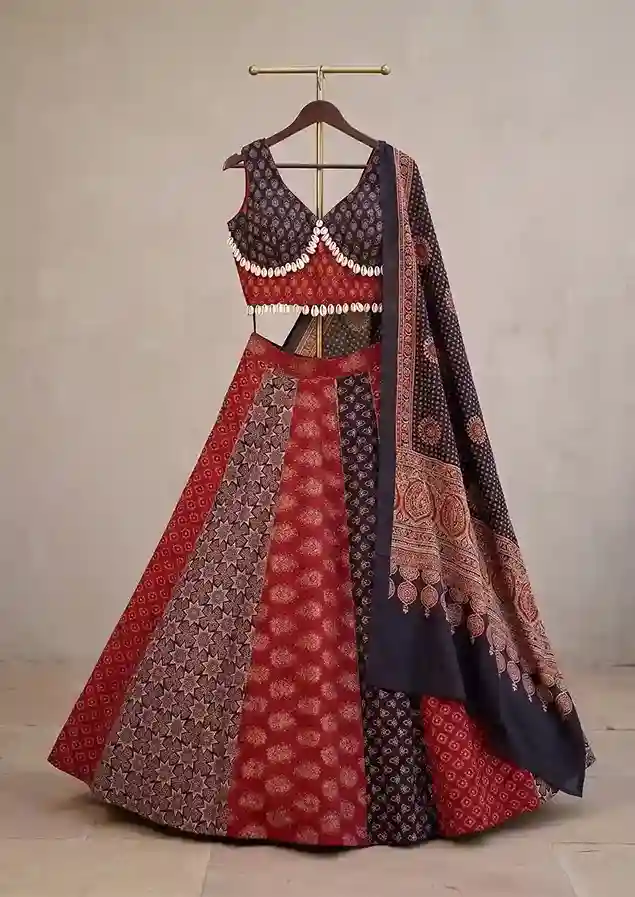 Your garment photo
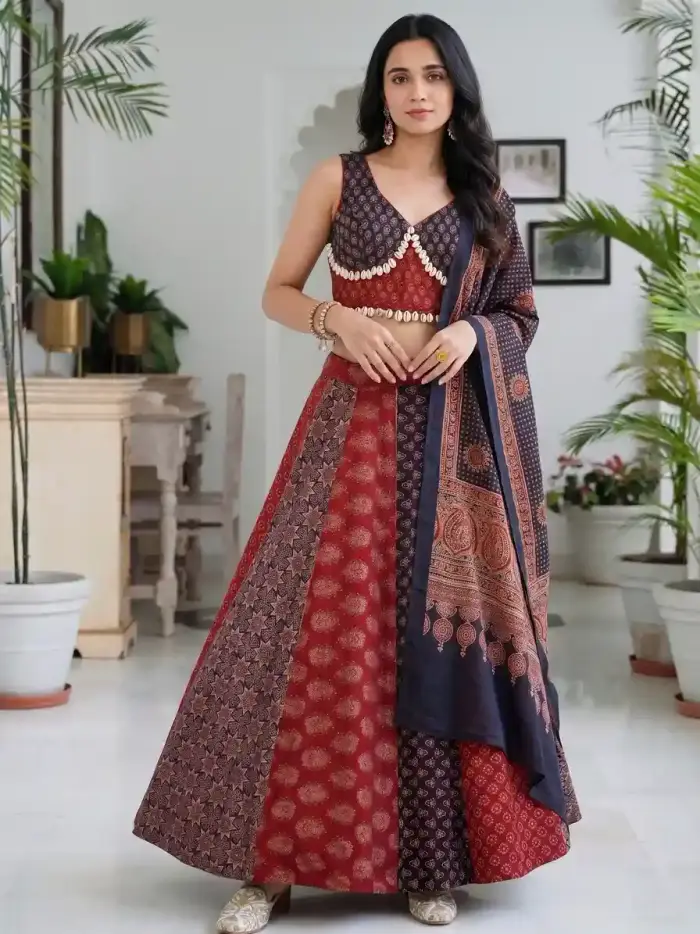 The on-model shot
Left: a lehenga set on a hanger, the way a seller photographs it. Right: the same set on a model. Check the skirt panels, the blouse trim and the dupatta against the original.
2. Choose first, see first
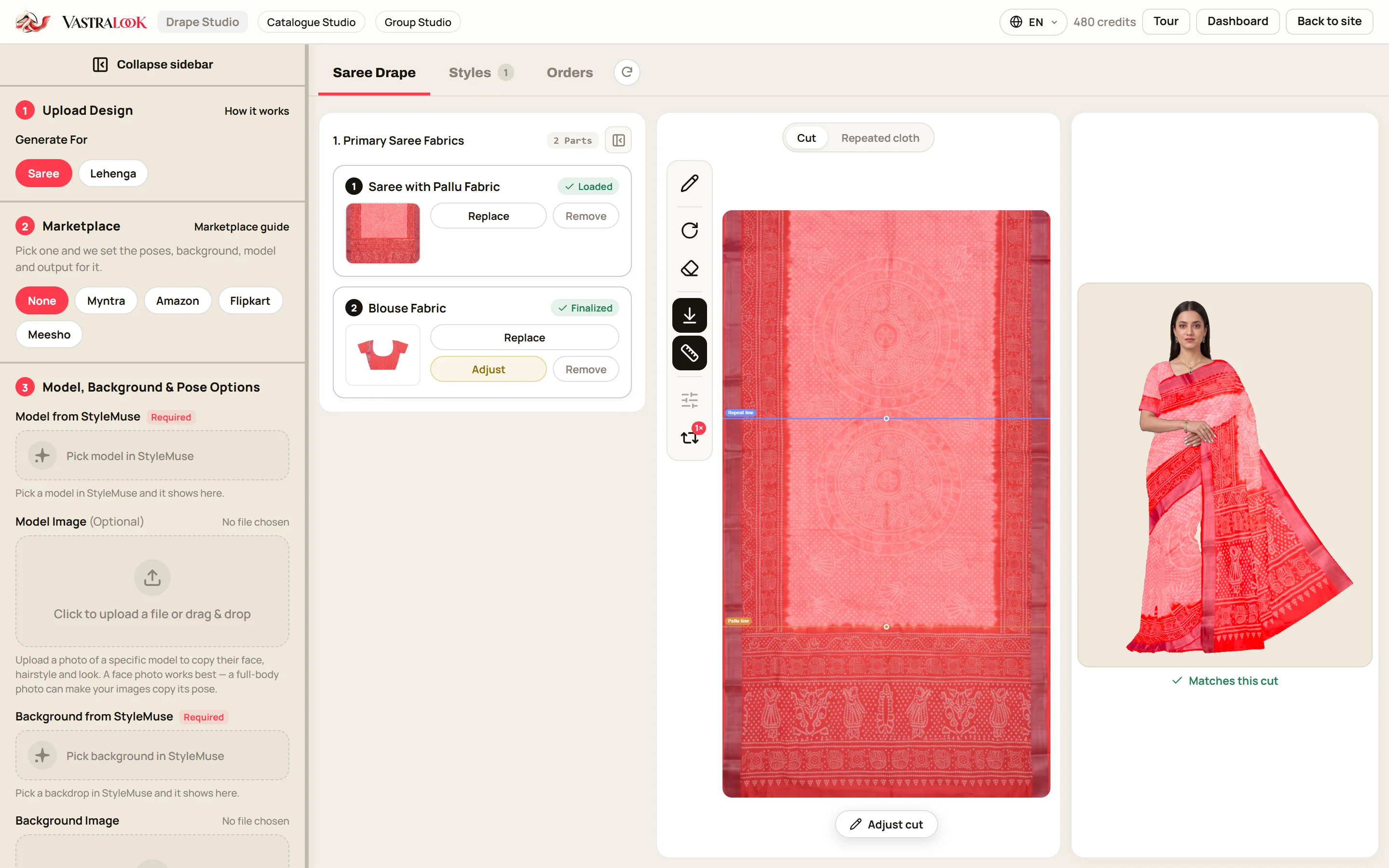
Many tools make you generate first and hope. In our studios you pick the model, the pose, the background and the garment before you order, and you see them. In Catalogue Studio the summary lists every combination before you pay. In Drape Studio the live drape preview shows your fabric on a body while you edit, and it is what the AI works from. You are not buying a lottery ticket. You are approving a plan.
3. Consistency across a batch
A catalogue is a set. If the model's face, the camera angle and the room change every time, thirty listings look like thirty different brands. Vastralook is built to keep your choices across a batch, and Same Model, Same Set locks the model, pose and scene and changes only the garment. We say built to keep and matches as closely as it can, because that is what is true: it is designed for consistency, and you should still check each shot.
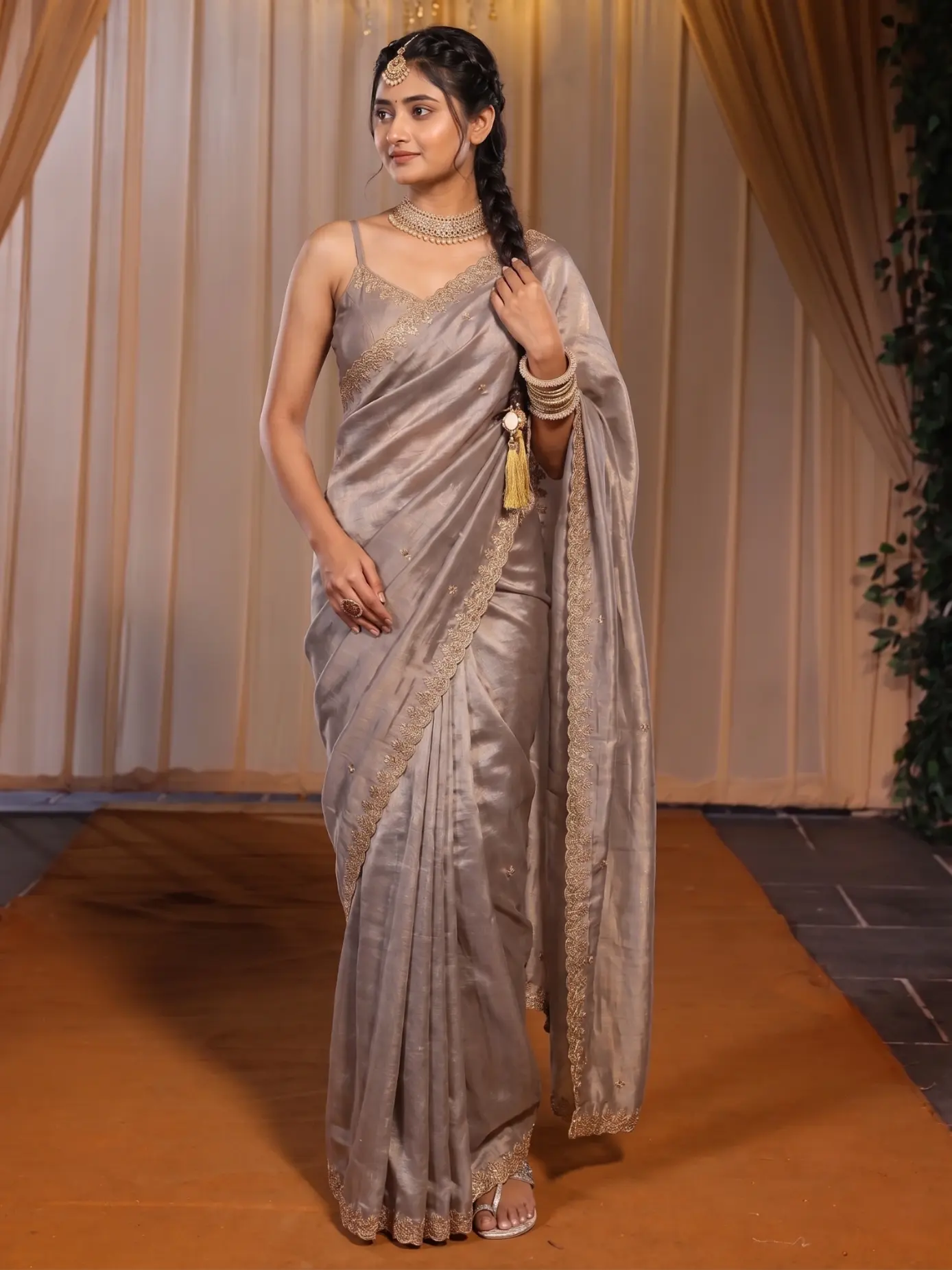 Garment one
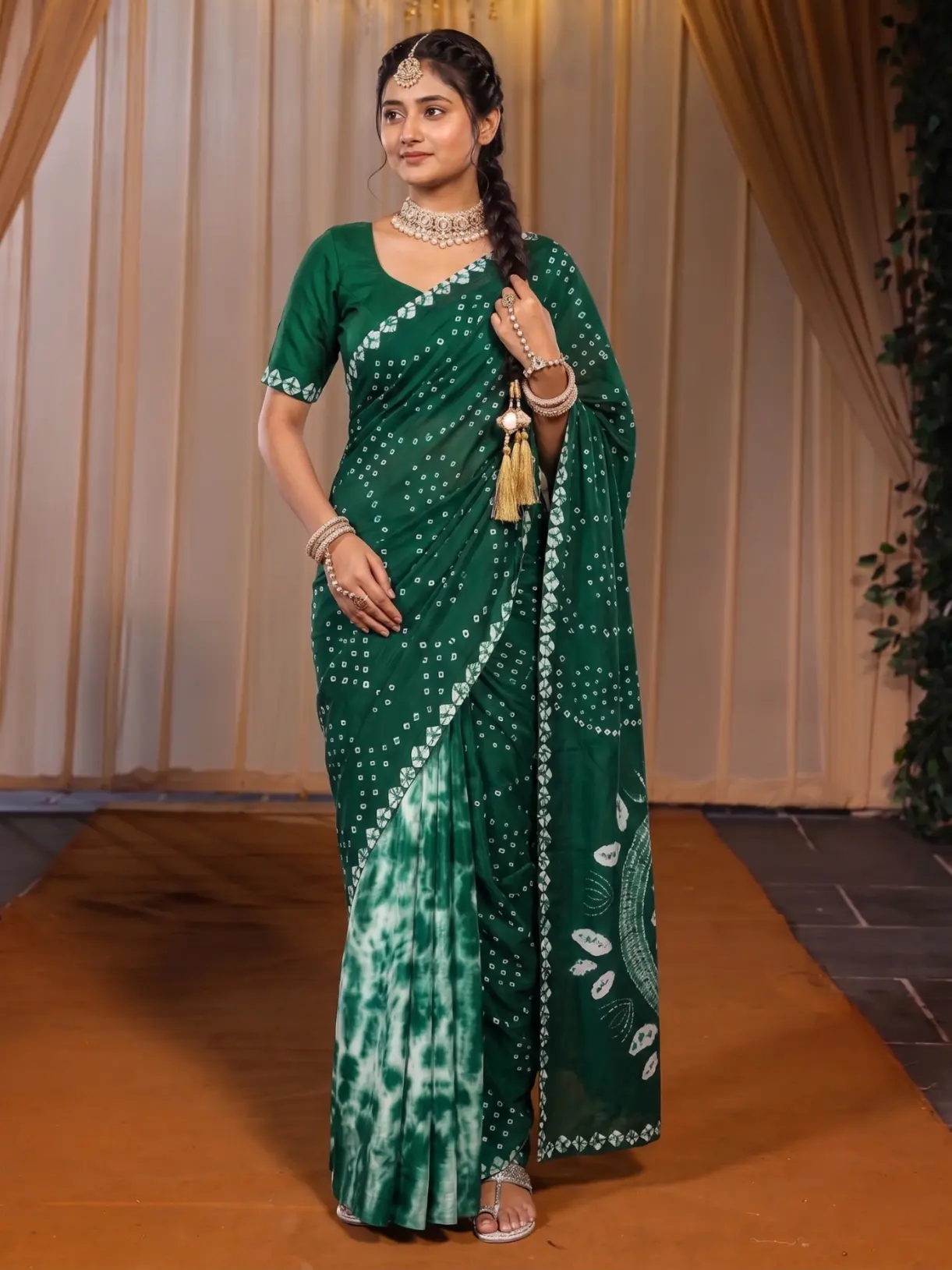 Garment two
The model, the pose and the scene stay put. Only the garment changes.
4. The saree, which general tools find hardest
A saree is the garment where guessing hurts most. Drape Studio does not guess. You mark the cut so the studio knows which part of your photo is cloth. You mark the pallu line so the pallu design lands over the shoulder and not on the pleats. You mark one pattern repeat so a small motif stays small. And you watch the live preview before you order. Even then the final photo drapes naturally, so the pleat count can differ from the preview. We say so because a seller who knows that will not be surprised.
5. Ownership, invoices and the boring things that matter
- You own your images and can use them commercially: store, marketplaces, ads and social media.
- GST invoices: add your GSTIN at checkout for a business invoice.
- English, Hindi and Gujarati across the studios.
- Marketplace presets for Myntra, Amazon, Flipkart and Meesho.
- Your logo on every download, with the corner, size and opacity set once.
- Shots stay in Orders for you to download, and you pay by UPI, cards or net banking.
Why this approach suits a clothing seller
A fashion brand is not a single image. It is a promise that this product, in this colour, looks like this, and looks like it belongs next to the one beside it. The approach that serves that promise is reference-first, choose-first, consistent across the batch. A tool built around inventing a picture from words is built for a different job, and a clever prompt does not turn it into a catalogue system.
There is also the money. A traditional shoot is booked per day for every design. In Vastralook a Create order shot costs from ₹7 at 1K and from ₹10 at 2K, depending on the pack, and a Budget order usually takes 4–5 minutes. Because you check the summary first, you only pay for combinations you chose. Whatever a tool charges per image, a picture you cannot use is the most expensive picture there is, so count the tries as well as the price.
- A catalogue of many garments that need one look.
- Sarees, where the pallu and pleats matter.
- Marketplace listings that need a set background and size.
- Matching sets that need a group picture.
- Sellers who want to see and approve before they pay.
- A hero campaign built around a real person or a real place.
- Art, moods and concepts with no garment to match.
- Anyone who needs a result exact to the thread. AI output is not exact.
Doubts, answered plainly
Will it look fake?
Studio-quality and photo-realistic is what we aim for, and a good shot is hard to tell from a studio photo at listing size. But some shots will miss, with a stiff hand or an odd fold. That is why every shot is yours to check, and why Recreate and the half-credits-back request exist.
Will my design change?
Your garment photo is the reference, so the print, border and colours come from your garment, and Vastralook is built to keep them. AI output is not exact, though, so look at the border, the print and the embroidery on each shot and compare them with your photo.
What if the face looks off?
Faces can occasionally come out wrong, as with any AI image. Recreate the shot, or pick a different model. In Catalogue Studio you can also use a face photo of your own, and in Group Studio each person comes from your own approved photo.
Is it legal to use the images commercially?
Yes. The images you generate are yours to use commercially: on your store, marketplaces, ads and social media. If you add a face photo of a person, make sure you have that person's permission.
What if I do not like the result?
Recreate it. If a paid shot missed, you can ask for half the credits back, and the team reviews each request. If a shot cannot be made at all, its credits come back.
Is it only for sarees?
No. Drape Studio is built for sarees, and Catalogue Studio handles kurtis, lehengas, dresses, suits, co-ords, western wear, footwear and accessories. Group Studio makes group pictures from any of them.
How is this different from asking an AI chatbot for a model photo?
A chatbot invents a picture from your words. Vastralook starts from your garment photo, lets you choose the model, pose and background first, shows you what you are ordering, and is built to keep those choices across a batch. A chatbot has no cut, no pallu line and no summary to check.
Can I trust the colours?
Colours are taken from your garment photo, so shoot it in even daylight on a plain background and keep your phone's filters off. Even so, colour can shift slightly, so check each shot against the garment, especially for dark or very bright shades.
Can it replace every shoot I do?
No, and we would not say it can. A hero campaign with a real person on location needs a real shoot. Vastralook is for the daily work of listing many garments with one look.
What does it cost, and is there a free trial?
A Create order shot costs from ₹7 at 1K and from ₹10 at 2K, depending on the pack. New accounts get up to 3 free 2K images, so you can test it before you pay.
How to test it fairly
- Pick one garment you know well
A saree with a heavy border or a kurti with embroidery is a good test, because you will notice if anything changes.
- Use your original product photo
Not an earlier AI image. Shoot it flat, square-on, in even daylight.
- Choose, then check the summary
Pick the model, the pose and the background. In Drape Studio, look at the live preview. In Catalogue Studio, open the summary.
- Compare against the garment
Put the result next to the photo. Check the border, the print and the colour.
- Recreate once if you need to
A miss is normal. If a paid shot truly missed, ask for half the credits back.