If you are looking for Claid.ai and Pebblely alternatives for apparel, the first thing to say is that neither tool is bad. They solve a different problem from the one a clothing seller has. This article explains where product background tools stop being enough for fashion, what an on-model studio does instead, and how to decide which one your catalogue needs. Vastralook is our own product, so we keep the comparison to what each tool does and give you criteria you can test yourself.
What are Claid.ai and Pebblely good at?
Both tools take a photo of a product and improve the scene around it. Claid.ai offers product enhancement plans and Pebblely offers product photography plans, and both are widely used for objects with a fixed shape: skincare bottles, electronics, watches, sneakers, packaged food and home decor. For those products, a clean cutout on an attractive generated background is genuinely what the buyer needs to see. The object does not change shape when it is photographed, so a background swap does most of the work.
If that describes your range, you may not need an alternative at all. Check their own pricing pages for the current plans, because they change.
Why does clothing need a model, not a product cutout?
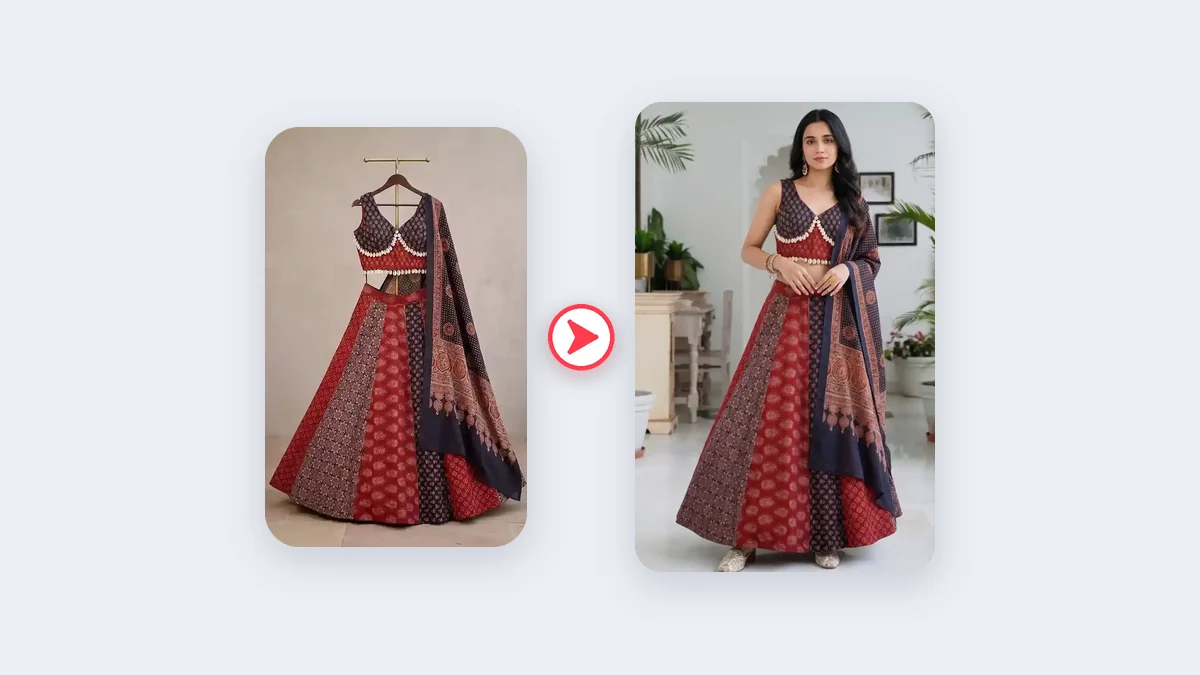
A saree, a kurti or a gown has no shape of its own. It takes its shape from the person wearing it. A flat photo of a folded saree on a marble table still looks like a piece of unstitched cloth, however good the table is. The buyer's real questions are about the garment on a body: where the pallu falls, how long the kurti is, how the sleeve sits, whether the print stretches over the bust. A background tool cannot answer them because the image contains no body.
Marketplace rules are the second reason. Many fashion categories ask for photos of the garment worn, or for particular views. Rules differ by marketplace and by category and they change, so check the image rules in your own seller panel for your category instead of relying on a blog post, including this one.
| Question | Product-background tools (Claid.ai, Pebblely) | On-model fashion studio (Vastralook) |
|---|---|---|
| What it mainly does | Generates backdrops and surfaces behind a product cutout | Places your garment on a model in poses you choose |
| Shows fit and silhouette | No body, so the garment stays flat | Shows the garment worn, with pose and drape varying shot to shot |
| Sarees and blouses | Not built to drape a saree or construct a blouse | Drape Studio: set the pallu line, optionally add blouse fabric |
| Best-suited products | Skincare, electronics, watches, sneakers, home decor | Sarees, lehengas, kurtis, gowns, Western wear and other garments |
| Marketplace rules | Check your category's rules in the seller panel | Marketplace presets for Myntra, Amazon, Flipkart and Meesho in Drape Studio; still check the rules |
| What you must still do | Photograph the product well | Photograph the garment well, then check every shot |
How do you decide which tool your catalogue needs?
Instead of comparing feature lists, answer these questions about your own range. They apply whichever tool you end up with.
- Does a buyer need to see the item worn to trust the purchase? For clothing the answer is almost always yes.
- Is the item rigid or soft? Rigid items keep their shape in any photo. Soft goods change with every pose and fold.
- Does your marketplace category ask for on-model images or particular views? Read the seller panel rules for your category.
- How many products and how many images per product do you need? Multiply them, then price the total on each tool's own page.
- Do you need the same face across a collection? On-model tools differ here, so test it on three garments.
- What happens when a result is wrong? Ask each tool about failed results and refunds before you pay.
What does an on-model studio do differently?
In Vastralook there are two studios. Drape Studio is for sarees and lehengas. You upload one flat photo of the full saree, body and pallu together, and optionally a blouse piece. You square up the cut, set the pallu line, and press Use this cut to see the saree draped. You then pick a model and a background from StyleMuse, choose poses in the Styles tab, and press an order button, Instant or Budget.
Catalogue Studio is for every other garment. You upload up to four photos of each piece, pick models and styles or a ready-made package, check the Summary tab where garments x models x styles equals the number of shots, and then order. You can filter models by region, age, skin tone and body type.
What can on-model AI not do?
On-model tools have limits too, and a fair comparison should say so.
- The output varies. Pose, drape and fine detail can differ from your reference, so you need to look at each shot, not trust the batch.
- The shot is only as good as your photo. A garment photographed under a yellow bulb or with a beauty filter passes its colour cast on to the result.
- It makes still images. Vastralook does not make video.
- It is built around garments. For footwear, bottles, watches and other rigid products, a product tool is the more natural fit.
- It does not replace a physical sample for a buyer who needs to feel the fabric.
Can you use a product tool and an on-model studio together?
Yes, and for many brands that is the sensible answer. A label that sells sarees and also a small line of perfumes or leather accessories can use a product tool for the objects and an on-model studio for the garments. The thing to avoid is forcing one tool to do the other's job: a cutout of a folded saree on a beach background, or a garment studio asked to photograph a shoe.
How should you run a fair test before you commit?
- Pick three different products
Choose one easy garment, one with a print or border and one that drapes, such as a saree or a gown. If a tool only works on the easy one, you will find out now.
- Use the same source photos in every tool
Photograph each garment once in daylight, square-on, filling the frame, and use the same photo in every tool you test.
- Compare the results with the real garment
Look at colour, border, print scale and drape on a phone screen, the way a buyer will. Ignore how impressive the background is.
- Check the costs and the safety net
Work out the cost of your real catalogue size, and find out what happens when a shot fails or misses. In Vastralook, a failed shot's credits come back automatically, and a missed shot can be sent for half its credits back after a person reviews it.
Frequently asked questions
Can Pebblely generate fashion models wearing my clothes?
No. Pebblely places flat product cutouts onto AI-generated surfaces such as tables, podiums and outdoor scenes. It does not wrap or drape textiles onto human models.
Is Claid.ai a good choice for clothing sellers?
Claid.ai is built for product enhancement and works best on rigid products. For clothing, where buyers want to see fit and drape on a body, an on-model tool is usually a better match. Check Claid's own site for its current features.
Does Vastralook support accessories and footwear?
Vastralook is built around garments on models, with 102 garment types in Catalogue Studio plus sarees and lehengas in Drape Studio. For footwear and other rigid products, a product-background tool is the more natural fit.
Will an on-model image pass marketplace rules?
Rules depend on the marketplace and the category, and they change. Drape Studio has presets for Myntra, Amazon, Flipkart and Meesho that set poses, background and size, but you should still check the rules in your seller panel.
What if the AI shot does not match my garment?
Check the source photo first, since colour and detail come from it. If a finished shot missed, you can ask for half the credits back from the shot's menu in the Orders tab.
Related reading
Free AI garment analysis and AI recommendations in Vastralook
One thing worth checking when you compare tools is what happens before you spend anything. In Vastralook, uploading a saree photo starts a free AI garment analysis: the category, occasion, fabric, colours, design and work are read from your photo, and no credits are used. From that reading it suggests five ready looks, each a model, a background and jewellery chosen together, with a match score. One click fills all three.
That is how a shoot starts from the right choices instead of a blank page, and why the finished shots come out studio-quality and consistent with the garment you uploaded. The analysis and the recommendations are suggestions: you choose, you see your choices before you order, and Vastralook is built to keep them.