If you sell clothes online in India, you will find that an AI fashion model generator can replace a large part of a photoshoot. But the best AI fashion model generators for Indian ecommerce are not the same ones that suit a European streetwear brand. A Kanjivaram saree, a heavy lehenga and a printed kurti set ask different things of the software than a plain white tee does. This guide explains how to compare tools, summarises what we noted about five of them, and gives you a short test to run before you spend money.
How should you compare AI fashion model generators?
We looked at five criteria, which are the ones that matter most to an Indian seller. Use them as your own scorecard.
- Ethnic garment fidelity. Does the tool handle a saree with a separate pallu and blouse, a lehenga with a dupatta, or a kurta set with a printed border, or does it treat everything as a simple dress?
- Indian model range. Can you pick models by region, age, skin tone and body type, so your customers see someone who looks like them?
- Output resolution. Is there a sharp, large option for zoom and for print, and what does it cost?
- Pricing in rupees. Can you pay in rupees, get a GST invoice, and see what a single image costs rather than only a monthly fee?
- Ease of use. Can the person who knows the product operate it without learning prompt writing?
How do the five tools compare?
| Tool | Best for | Pricing noted at the time | Indian model range | Saree and blouse support |
|---|---|---|---|---|
| Vastralook | Sarees, ethnic wear and batch catalogues | Credit packs and plans; see the pricing page | Filter by region, age, skin tone and body type | Drape Studio with pallu line and blouse fabric |
| FASHN.ai | Western apparel, developer API | About $29 a month (roughly 2,450 rupees) | Limited Indian models | No separate pallu or blouse |
| Botika | Quick background and face swaps | About $15 a month (roughly 1,250 rupees) | General Asian profiles | Basic dress overlays |
| SareeViz | A single saree, quickly | 999 rupees a pack | Indian-focused | Good draping, fixed angles |
| Photta | Simple social media mockups | Free tier, or about $19 a month | Mostly Western | A poor fit for ethnic wear in our notes |
Where does each tool fit best?
FASHN.ai
FASHN is aimed at Western apparel and developers who want to call an API. If your catalogue is mostly T-shirts, dresses and jackets and you have engineers on hand, it is a sensible candidate. In our notes it had a limited set of Indian models and no separate handling of a pallu or a blouse, which matters if you sell sarees.
Botika
Botika is geared to quick background changes and face swaps. We noted general Asian model profiles and basic dress overlays. It may suit a seller who needs fast social visuals for simple garments more than one who needs a drape-accurate saree.
SareeViz
SareeViz is built for generating a single saree quickly. We noted Indian-focused models and good draping but fixed angles. If you have a handful of sarees and little else, it is worth a look; if you also sell kurtis, gowns or Western wear, you will want to check how it handles those.
Photta
Photta is a simple tool for social media mockups, with a free tier. In our notes it was predominantly Western and a poor fit for ethnic wear. That does not make it a bad tool, only the wrong one for a saree catalogue.
Vastralook
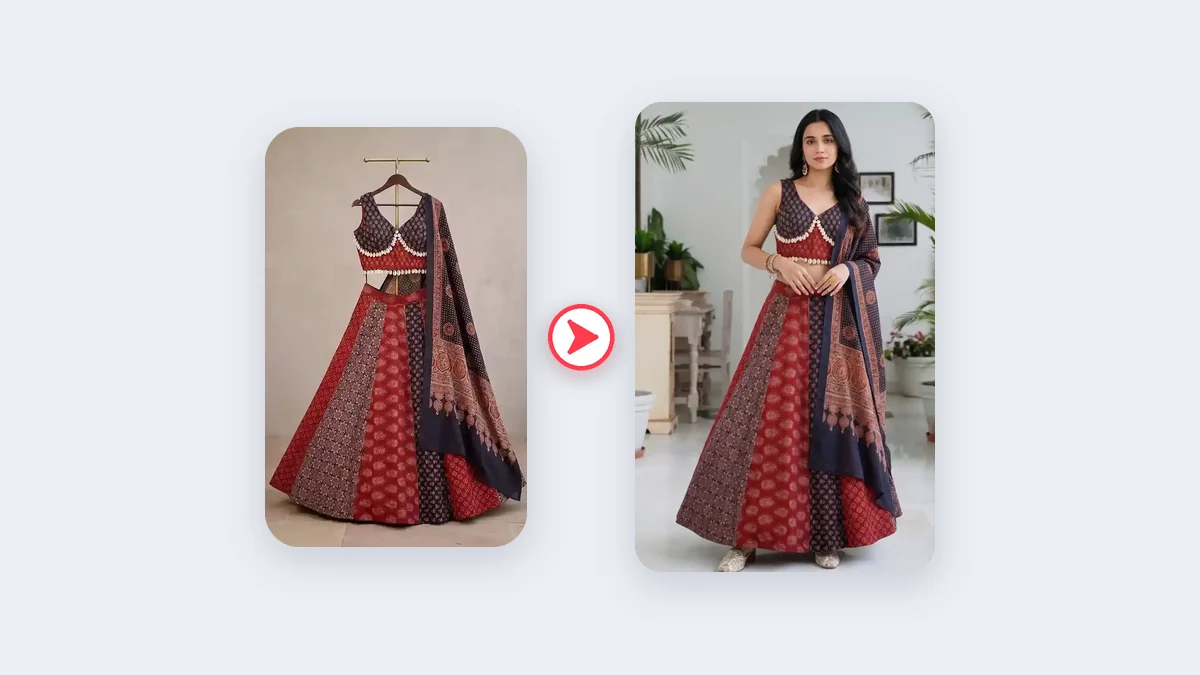
Vastralook has two studios. Drape Studio is for sarees and lehengas: one flat photo of the full saree, a cut you adjust, a pallu line you set, optional blouse fabric, then a model and a background from StyleMuse. Catalogue Studio is for every other garment: up to four photos per piece, models and styles you choose, and a Summary tab that counts garments x models x styles before you order. It makes on-model still images, not video, and the output varies, so every shot needs a look. Billing is in rupees with GST invoices, and credit packs do not expire.
Why does Indian model diversity matter for conversions?
In Indian fashion commerce, regional taste is real. A Kanjivaram silk saree is often shown with South Indian styling and temple jewellery, while a Phulkari suit or a Chanderi silk connects with North and Central Indian buyers. Customers also compare skin tone, age and build with their own. A tool that offers only a handful of generic faces limits how well you can match the model to the audience.
In Catalogue Studio you can filter models by region, age, skin tone and body type. In Drape Studio, you pick a model in StyleMuse, or upload a Model Image of a specific person to copy her face and look.
What does pricing really look like?
Monthly dollar subscriptions suit a seller who generates images every week. A seller who has a few big drops a year may prefer to pay per image. Vastralook sells credit packs, which do not expire, and plans, whose credits refresh monthly. Each shot costs credits: 7, 10 or 15 on a Budget order at 1K, 2K or 4K, and 10, 15 or 20 on an Instant order. The pricing page shows what packs and plans currently cost.
Whichever tool you use, convert everything into cost per finished image. Add the shots you will throw away, because some outputs will miss. Ask what happens then. In Vastralook a failed shot returns its credits automatically, and a shot that missed can be sent for half its credits back after review.
How to test a tool before you pay
- Choose three hard garments
Pick a saree or lehenga, a printed kurta set and something with a border or heavy work. These show the gaps fastest.
- Photograph them properly
Use daylight, a plain background and a square-on camera, and fill the frame. Use the same photos in every tool.
- Ask for the same look in each
Pick a similar model, pose and background so you are comparing the garment, not the styling.
- Judge on a phone
Open the results on a phone, at the zoom a buyer would use. Check colour, border, print scale and the pallu.
- Count what you would keep
Out of ten shots, how many would you publish? That ratio, not the best image, tells you the real cost.
Frequently asked questions
Which tool is cheapest for an Indian boutique?
It depends on how much you shoot. A seller who generates a lot each month may find a subscription cheaper per image, while a boutique with occasional drops may prefer credit packs that do not expire. Vastralook sells packs from its pricing page, so you pay per shot instead of a monthly fee.
Can I generate photos on real Indian backgrounds?
In Drape Studio you pick a background from StyleMuse, or upload the exact scene you want behind the model. In Catalogue Studio each style sets the pose, framing and setting, and you can search styles by background or object.
Do AI fashion model tools support sarees?
Some do better than others. Ask whether the tool handles the pallu and the blouse separately and lets you choose where the pallu falls, then test with your own saree. Drape Studio in Vastralook is built around that.
Are AI model photos good enough for Myntra, Amazon, Flipkart and Meesho?
Drape Studio has presets for all four that set poses, background, model, size and format. Marketplaces change their rules, so check your seller panel before you upload.
Can I use the same model for my whole collection?
Yes in Vastralook: pick the same model in Catalogue Studio for every batch, or the same StyleMuse model or uploaded Model Image in Drape Studio. Check that the face stays consistent in the results.
Fashion model photo ke liye AI tool kaise chunein?
Pehle dekhein ki tool aapka asli kapda (rang, print, border) bachata hai ya nahi, Indian kapdon aur saree ko support karta hai ya nahi, aur kharcha kaise lagta hai. Ek kapde par pehle test karein aur har photo asli kapde se milayein.
Related reading
Free AI garment analysis and AI recommendations in Vastralook
One thing worth checking when you compare tools is what happens before you spend anything. In Vastralook, uploading a saree photo starts a free AI garment analysis: the category, occasion, fabric, colours, design and work are read from your photo, and no credits are used. From that reading it suggests five ready looks, each a model, a background and jewellery chosen together, with a match score. One click fills all three.
That is how a shoot starts from the right choices instead of a blank page, and why the finished shots come out studio-quality and consistent with the garment you uploaded. The analysis and the recommendations are suggestions: you choose, you see your choices before you order, and Vastralook is built to keep them.