
A Surat saree wholesaler launches a catalogue of eight designs. Each design has a number, a colour and a rate, and a reseller buys them as a set. On WhatsApp she shares eight pictures, one by one, and the reseller scrolls past three of them. What she really wants is one picture she can post in her group that says, at once: this is the set, and these are its designs. That single picture is what Group Studio is for.
Why a saree set needs one picture that shows all of it
Traders who sell by the catalogue, the vyapari and the marketers who work with them, think in sets. A reseller does not buy one saree. She buys a catalogue of a few designs that go together in fabric, price and season. A group picture does a job that single photos cannot. It tells a buyer how big the set is, how varied the colours are, and what it will look like on a shelf or in a Status. It also works as a cover: the one picture that goes at the front of the catalogue, on the post and on the WhatsApp message.
Making that picture has always been awkward. You can hire several models for a day and shoot them together, which is expensive and has to be planned. Or someone can cut out each saree photo and place them side by side, which takes hours and rarely looks natural because the light does not match. For a wholesaler with a new catalogue every few weeks, neither is practical.
What Group Studio does, in plain words
Group Studio takes finished photoshoots that you already have and builds one group picture from them. A photoshoot here means one finished photo of one person wearing your product. It can come from Drape Studio, from Catalogue Studio or from your own camera.
- Make or collect one finished photo per design
Drape Studio gives you a draped saree photo from a flat photo. You can also use a photo from your own camera. JPG, PNG or WebP.
- Add the photos to Group Studio
One for each person in the picture, up to nine.
- Choose a pose
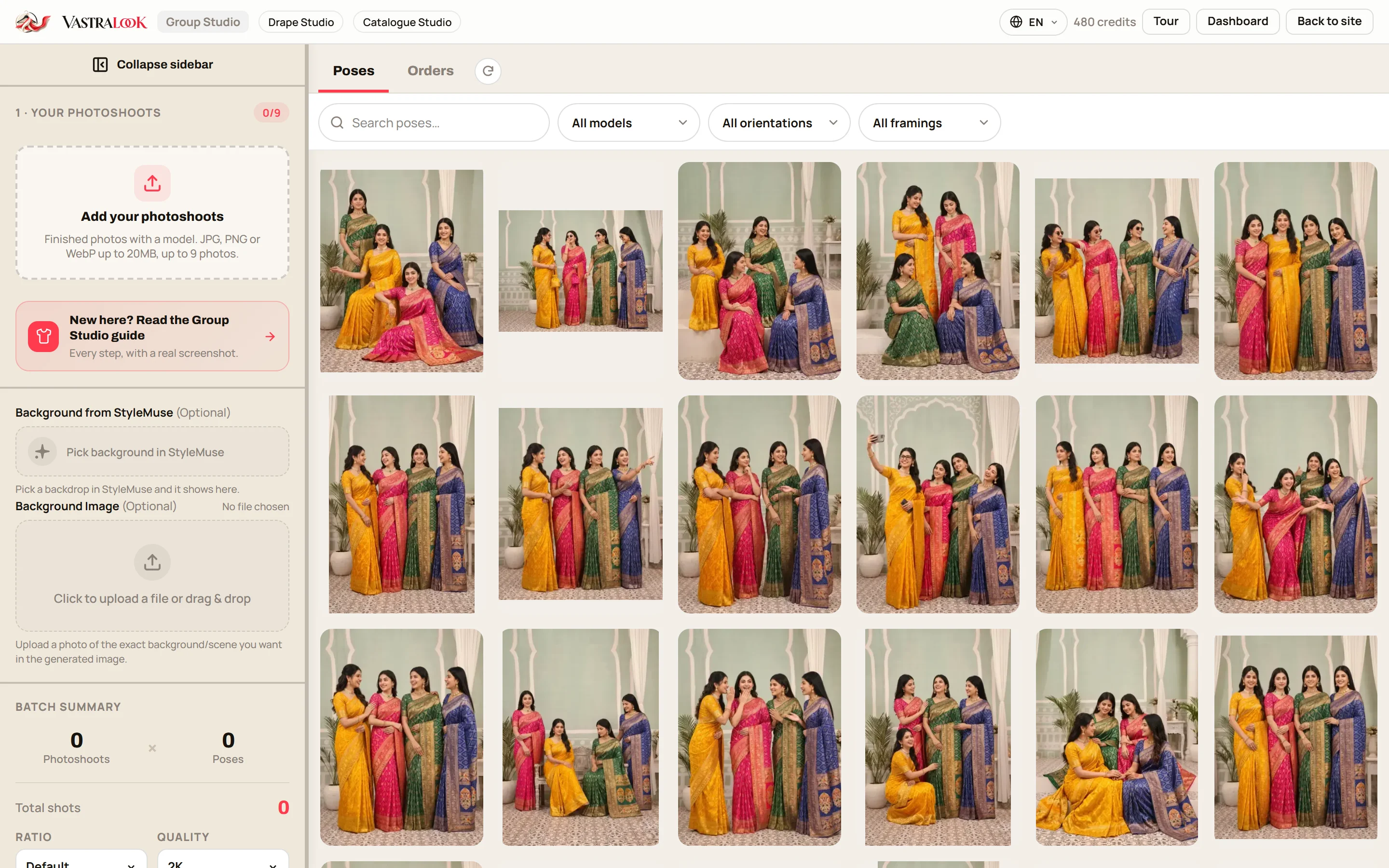
A pose is how the group is arranged: how many people, how they stand and how the picture is framed. Filter by number of people (2 to 9), picture shape and full or half body.
- Check the number
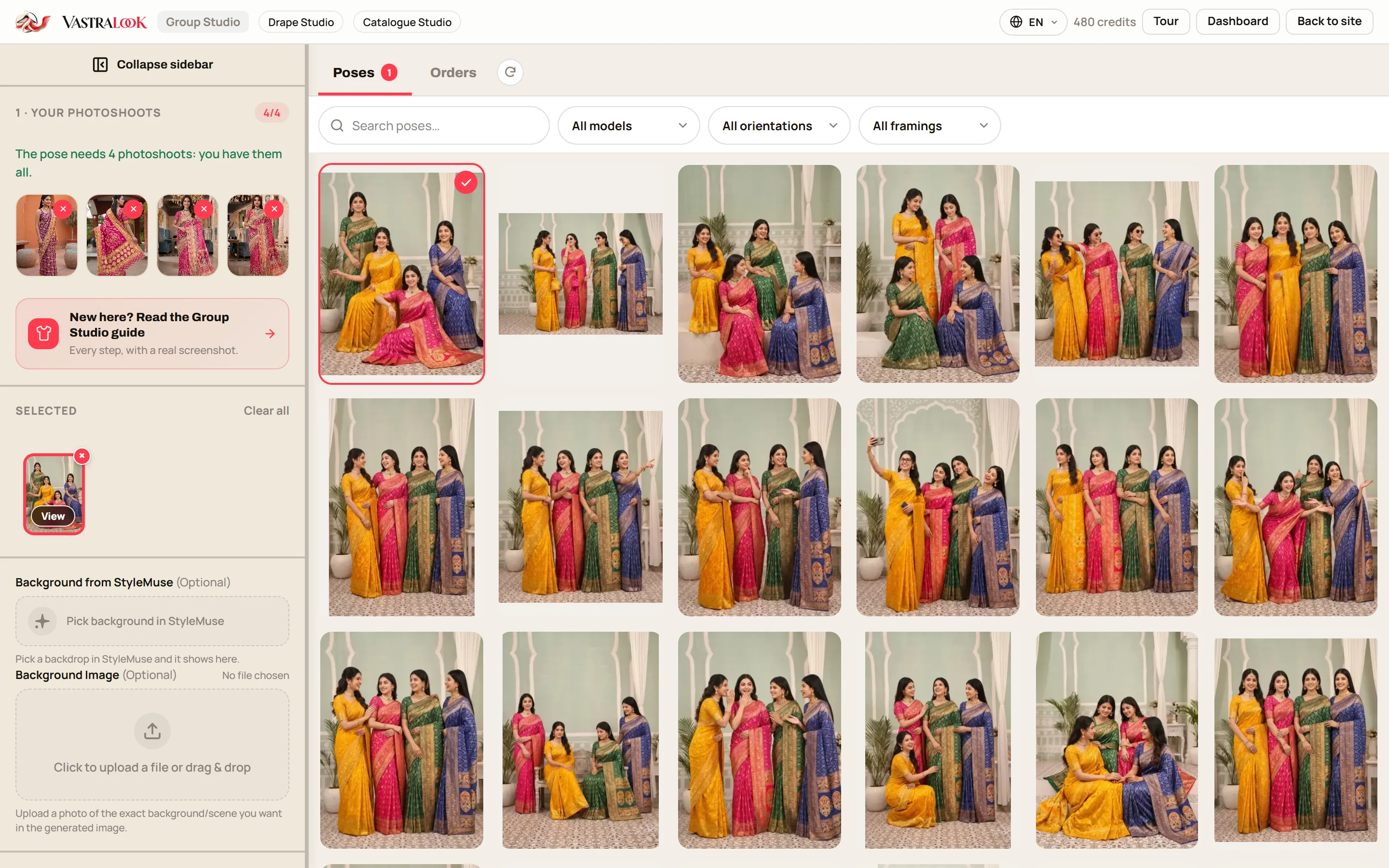
The pose shows one place per person, and the note turns green when you have the right number of photos.
- Choose a background if you want one
Keep each pose's own background, pick a backdrop from the library, or upload a photo of the scene you want. An uploaded photo wins.
- Set the ratio and quality, then order
The info button shows the price per size and the total before you press the order button. Finished pictures appear in Orders.
Who uses a group picture, and for what
| You are a | Your problem | What the group picture does |
|---|---|---|
| Wholesaler or manufacturer | A new catalogue every few weeks, and eight or twelve designs to show at once | One cover picture for the catalogue, with the set in one frame |
| Vyapari or vepari (trader) | Sending a long list of pictures to every buyer | One picture for the group or the broadcast, with the full set shown |
| Marketer or agent | A banner or a campaign picture for a launch | A wide picture with the whole set for ads and for the shop front |
| Reseller or boutique owner | Showing customers the range you stock without a flat table of sarees | A shareable picture of the range |
| Instagram and WhatsApp seller | A post that stops the scroll and shows the range | A 4:5 feed post or a 9:16 Status that shows the set |
The one rule: the same number of people and the same framing
An order takes poses with the same number of models and the same framing. If you add six photos, poses for six people are open, and the others are greyed out with a short reason. Full body and half body do not mix in one order. This keeps a batch simple, and it means you never order a pose your photos cannot fill. In practice it also shapes how you plan: if your catalogue has eight designs, you want eight photos with the same framing, and a pose for eight.
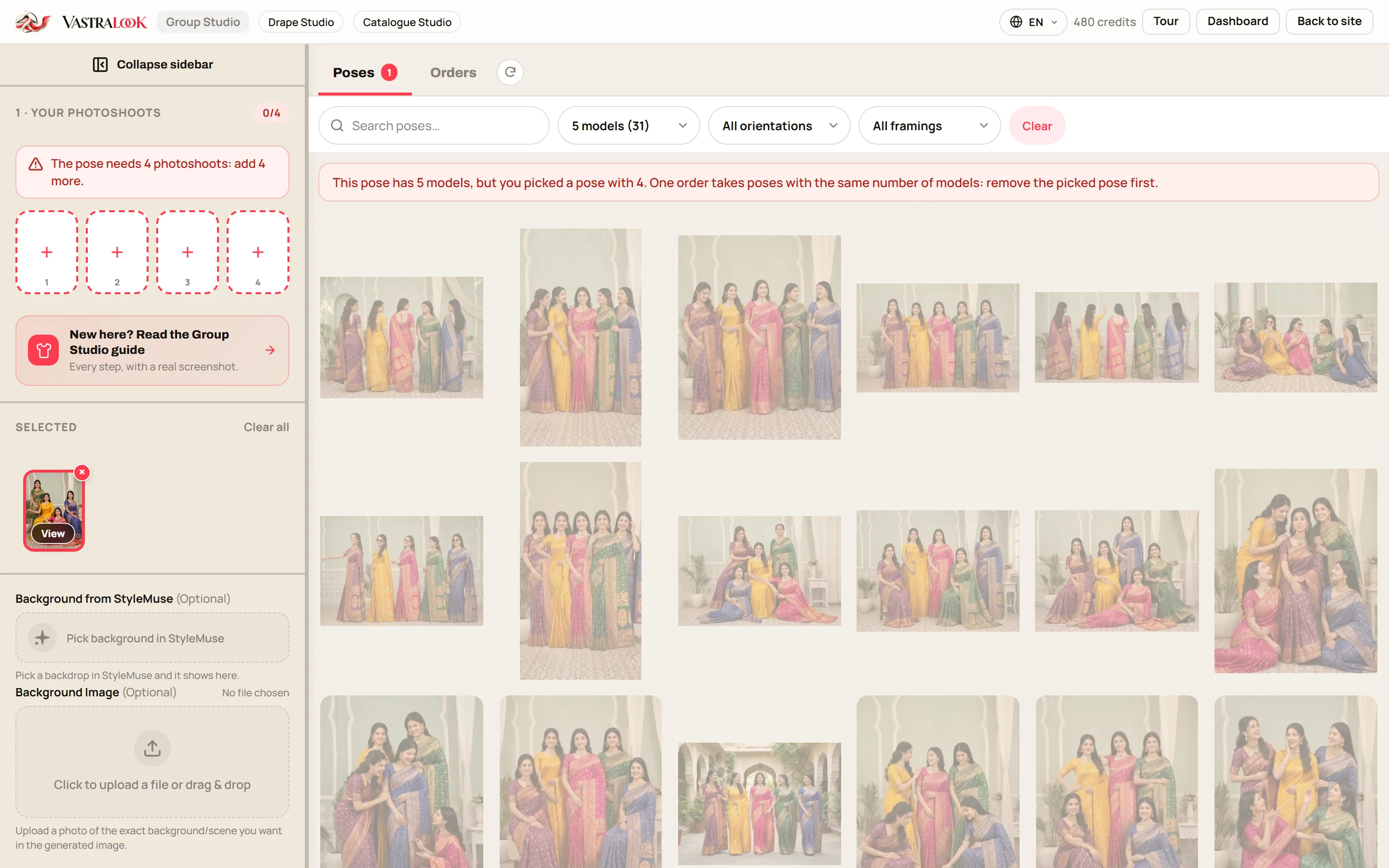
If you have more designs than a picture can hold, nine at most, make two group pictures: designs one to five in one, designs six to ten in another. Smaller groups also read better in a Status, because each saree is larger.
What a good start looks like
- One finished photo per saree design, with the saree fully visible and the face clear.
- The same framing in every photo: all full body or all half body.
- Broadly similar light across the photos, because a photo shot at dusk next to one shot at noon is the one thing a group picture cannot hide.
- Photos you have the right to use, including the permission of anyone whose face is in them.
- A pose chosen for the exact number of designs in the catalogue.
Where Group Studio fits in a catalogue workflow
The group picture is the last step, not the first. Make each design look right as a single on-model photo first. If you work with sarees, the flat photo to on-model route is Drape Studio, and the pallu line guide shows how to set the cut and the pallu. When the single photos are approved, a group picture from them takes a few minutes. The next post goes through that workflow from flat photo to catalogue cover, with ratios for Instagram and WhatsApp.
What it costs and how long it takes
Group Studio orders use the Instant and Budget order types. You choose the picture ratio and the quality, 1K, 2K or 4K, and the studio shows the price for your choice, with the total for the whole batch, before you confirm. If a shot cannot be made, its credits come back. Plans and credit packs are on the pricing page.
How can I show multiple sarees in one photo?
Make one finished photo for each design, add them to Group Studio and pick a pose for that number of people. The group picture shows the designs together.
Can Group Studio show one whole saree set in one frame?
Yes. Each person in the picture comes from one photo, and each photo shows one design of the set. Up to nine people fit in one picture.
How many sarees can be in one picture?
Poses are for 2 to 9 people, so up to nine photos. For a bigger catalogue, make two pictures.
Do I need real models for a group shoot?
No. You need one finished photo per design. It can come from Drape Studio, Catalogue Studio or your own camera.
Why is a pose greyed out?
An order takes poses with the same number of models and the same framing as your photos. A pose that does not fit is greyed out, and the studio tells you why.
Is it only for wholesalers?
No. Marketers, agents, vyapari, resellers, boutique owners and Instagram sellers can use the same picture as a cover, a Status or a post.
Will the sarees match my photos?
Each saree comes from your photo and Vastralook is built to keep it. AI output is not exact, so check the border, the pallu and the colour on each person.
What does it cost?
The info button on the order buttons shows the price per size and the total for your batch before you press it. If a shot cannot be made, its credits come back.
What if a group picture misses?
Recreate it, or ask for half the credits back on a paid shot that missed. The team reviews each request.
Who owns the group pictures?
You do. Everything you generate is yours to use commercially: on your store, marketplaces, WhatsApp, Instagram, ads and in a catalogue.


