
If you are a saree retailer, a vyapari with a shop full of new stock, a wholesaler sending catalogues to resellers, or a boutique owner who sells by WhatsApp, you know the problem. Every new design needs a model photo, and a saree photoshoot with a model, a drape artist and a photographer is a day of work for a handful of designs. So most sellers send the flat photo and hope the buyer can picture it.
Why a flat photo costs a trader sales
A saree is five or six metres of cloth that only becomes a garment when it is draped. A buyer on WhatsApp, Instagram or a marketplace wants to see where the pallu falls, how the border frames the edge and how the print looks on a body. A photo of the saree spread on a floor does not show that. A reseller who forwards your photo to her own customers has the same problem, one step further down the line.
The usual fix is a model shoot, and it does not scale for a trader. You need a model, someone who can drape, a place, a photographer and a date, and then you repeat it for every design and every colour. Ten new designs a week is not a shoot, it is a full-time job.
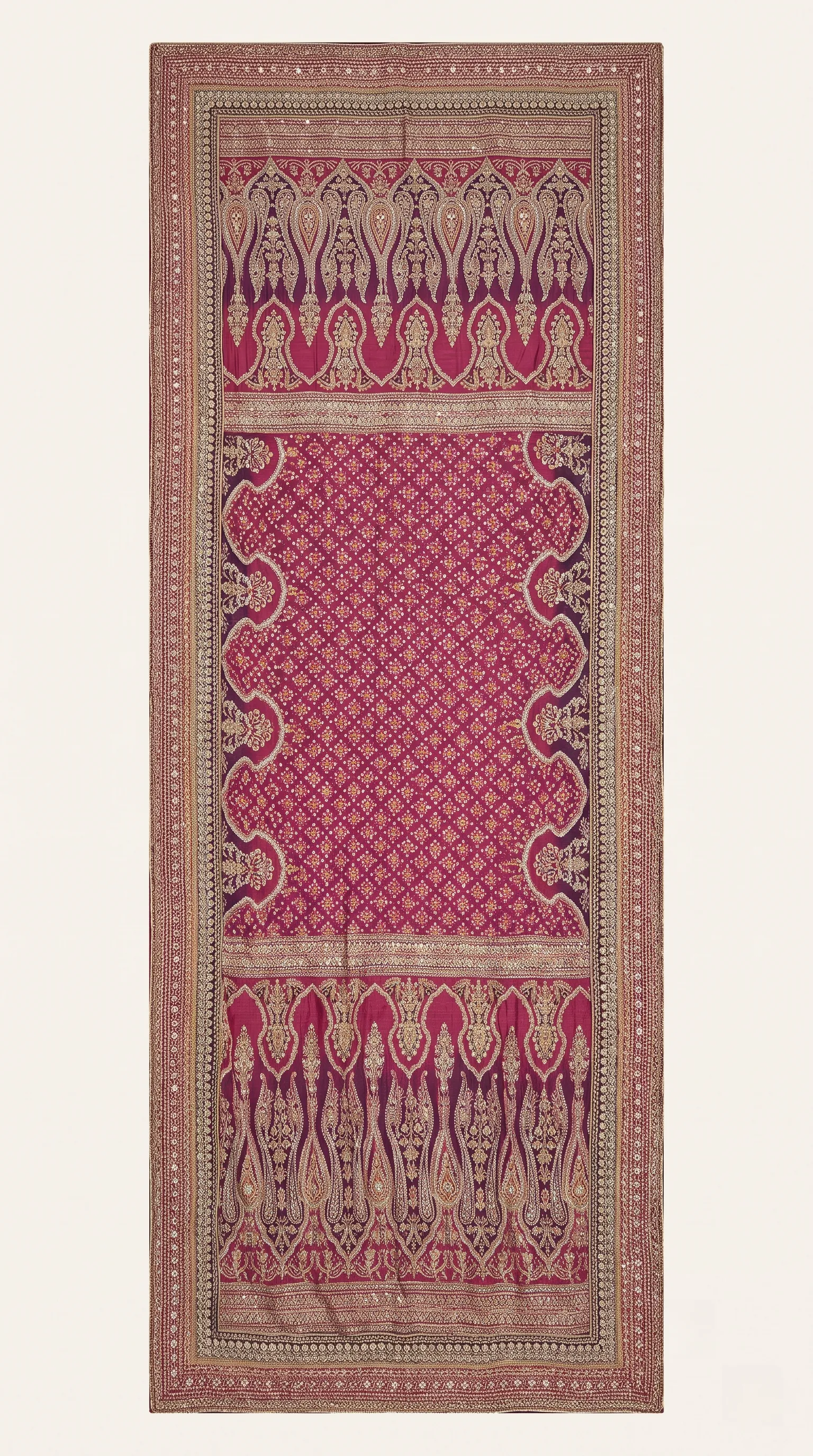 Flat photo you upload
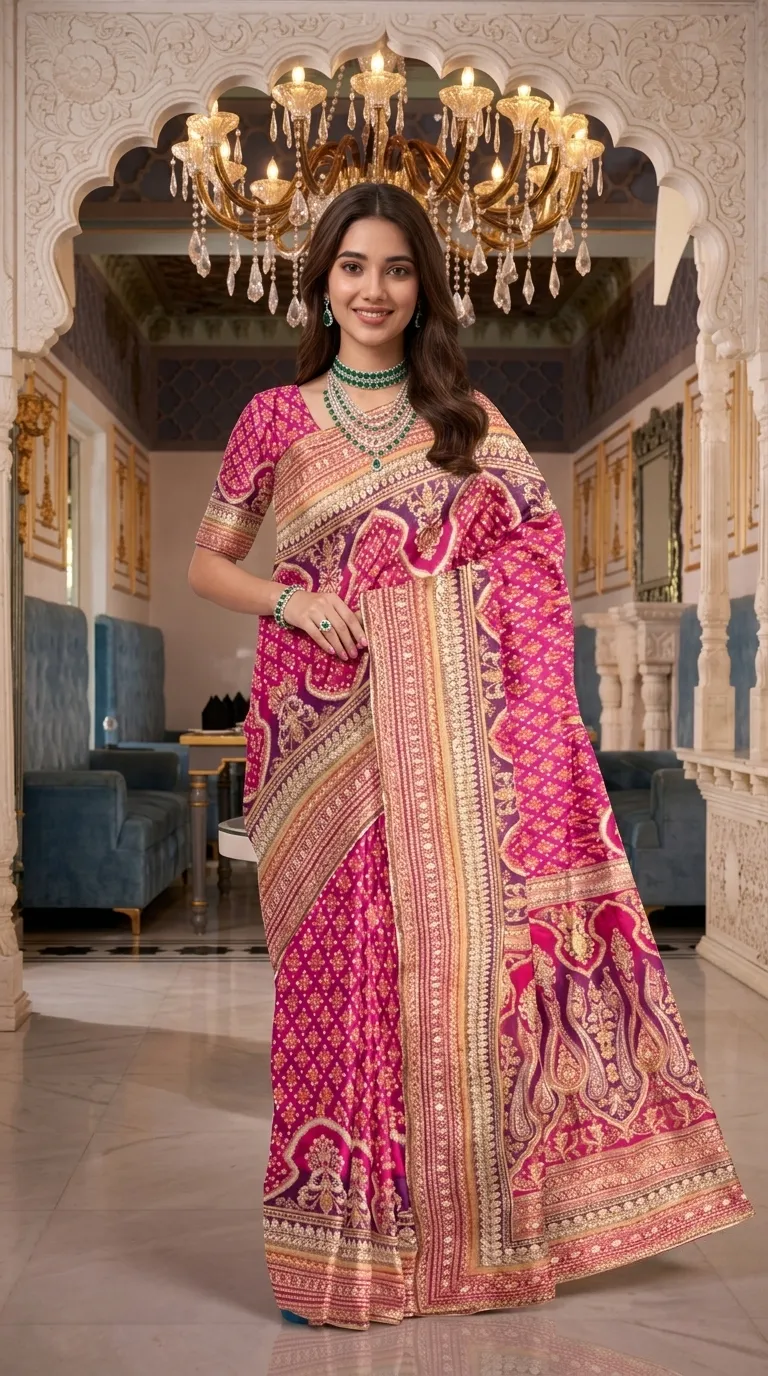 Draped on a model
Left: the saree laid flat, the way a trader photographs it. Right: the same saree draped on a model by Drape Studio. Compare the border, the pallu and the pattern with the flat photo.
What 'draping intelligence' means in plain words
A general image tool takes words and invents a saree, so it has to guess how a saree falls: where the pallu starts, how the border runs, which part of your print goes where. Drape Studio is built the other way round. It works out the drape from your saree photo. In practice that means four things you can see and control.
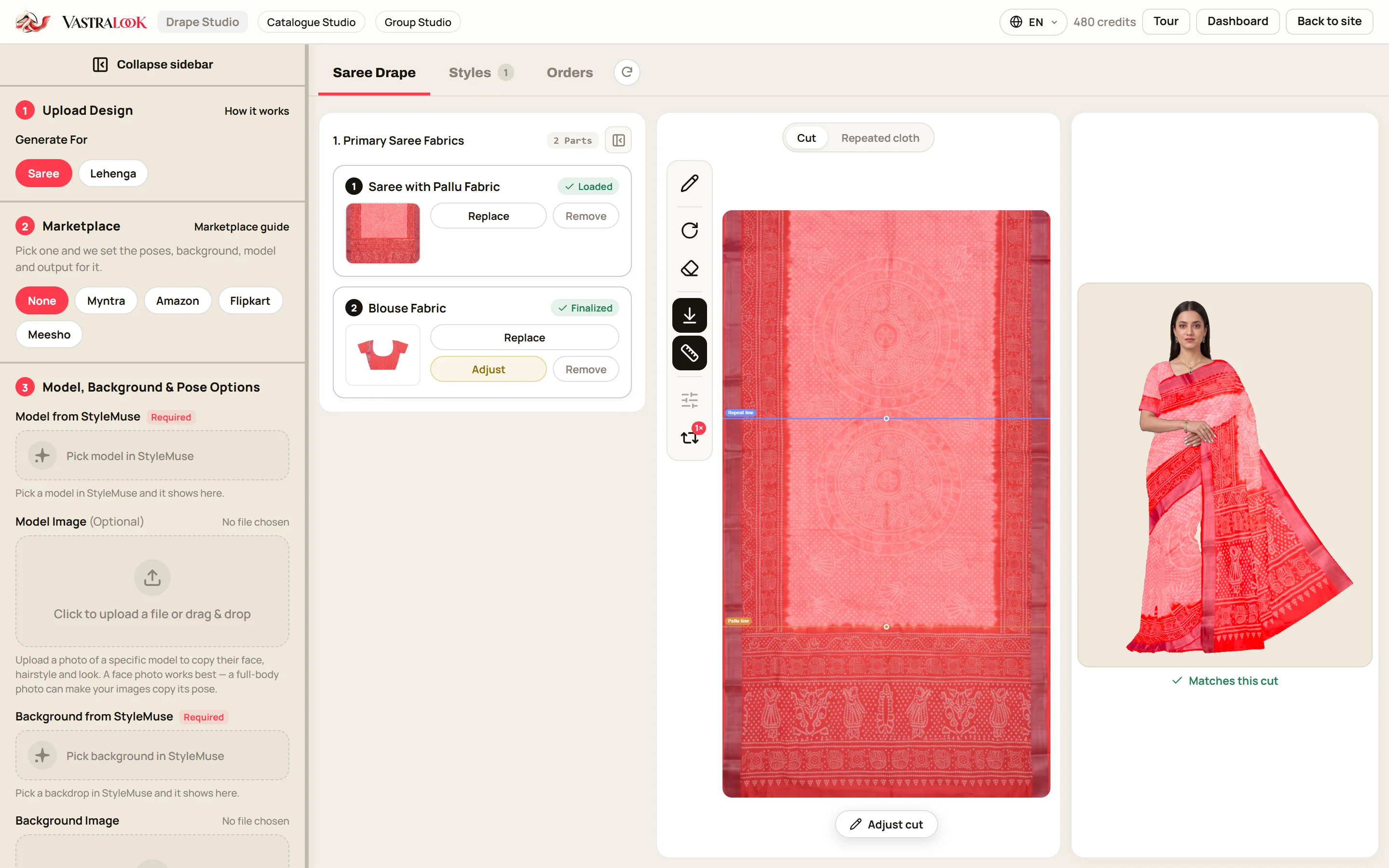
- It finds the cloth in your photo and straightens it. If the outline is slightly off you drag the corners until it fits.
- You mark the pallu line, so the pallu design lands over the shoulder and not on the pleats.
- You mark one pattern repeat, so a small butti stays small and a large paisley stays large.
- A live drape preview shows your fabric on a body while you edit. This is what the studio works from, so you can catch a wrong cut before you order.
Your saree photo is the reference, so the border, the print and the colours come from your cloth. Vastralook is built to keep them and matches your saree as closely as it can. It is not a promise that nothing can change, which is why checking each shot is part of the job.
How a vyapari uses it in a working day
- Photograph the saree flat
One photo of the whole saree, body and pallu, straight-on, in even daylight on a plain floor. A phone is enough. Use your original product photo.
- Upload and fix the cut
The studio finds the cloth. Drag the corners if the outline is off, then press Use this cut.
- Mark the pallu and the repeat
Two lines, about a minute. These decide where the pallu starts and how big the pattern is.
- Add the blouse piece and close-ups
Optional, but a blouse photo and a zari or border close-up help the fine detail.
- Check the live preview
Look at your fabric on the body. If the pallu is on the wrong side, fix it now, before you spend credits.
- Pick a drape, a model and a background
Or leave them empty and Vastralook chooses what suits the saree. For a marketplace, choose its preset and the background and size are set for you.
- Order, check, download
A Budget order usually takes 4–5 minutes. Compare each shot with your saree, then download with your logo on it.
Where the photos go: WhatsApp, Instagram and marketplaces
Most saree trade runs on a phone. Pick the picture shape you will post in: square for a WhatsApp catalogue or the Instagram grid, 4:5 for the Instagram feed, 3:4 for a marketplace listing, 9:16 for Stories and Status. The studio also has presets for Myntra, Amazon, Flipkart and Meesho that set the background and size, so you are not cropping every photo by hand.
Add your logo once and every download can carry it. That matters for a vyapari whose photos get forwarded: when a reseller shares your photo with her customers, your name travels with it. If you sell on Meesho in particular, the guide on AI photos for Meesho sellers goes through listing sizes and what buyers look at.
What it costs a retailer or wholesaler
A Create order shot costs from ₹7 at 1K and from ₹10 at 2K, depending on the credit pack you buy from. A Budget order usually takes 4–5 minutes. Use 1K for WhatsApp and quick drafts and 2K for marketplaces and your website. For twenty designs with one front shot each at 2K, that is 200 credits, from ₹192. Compare that with booking a model, a drape artist and a photographer for each design. Plans and packs are on the pricing page, and the figures there are always current.
The images are yours to use commercially on your store, marketplace listings, ads and social media. If you are registered for GST, add your GSTIN at checkout for a business invoice.
Who it is for, and who it is not for
- Retailers and vyapari with many new saree designs each season.
- Wholesalers who send catalogues to resellers and need a model photo per design.
- Boutiques that sell by WhatsApp and Instagram and have no budget for a shoot per design.
- Resellers who want better photos than the supplier's flat photo.
- A hero campaign built around a real person, a real place or a story.
- Anyone who needs a result exact to the thread. AI output is not exact.
- Kurtis, lehengas and dresses: use Catalogue Studio for those.
- A saree you have not photographed yet. You need one flat photo to start.
Photos that help, before you start
- One flat photo of the whole saree, straight-on, with the pallu in view.
- Even daylight and a plain floor, so shadows do not become part of the design.
- Your original product photo, never an earlier AI image.
- Optional: the blouse piece, and a close-up each of zari, lace or border.
- Keep phone filters off, so the colours you upload are the colours of the cloth.
Can a vyapari or wholesaler get model photos without hiring a model?
Yes. Upload one flat photo of the saree, mark the cut, the pallu line and the pattern repeat, and Drape Studio drapes your fabric on a model. You see a live drape preview before you order.
Does the design change?
Your saree photo is the reference, so the print, border and colours come from your cloth, and Vastralook is built to keep them. AI output is not exact, so check the border, the pallu and the colour on each shot against your saree.
How is this different from asking a general image tool for a saree photo?
A general image tool invents a picture from words and has to guess how a saree falls. Drape Studio works from your saree photo, with the pallu and the pattern repeat where you marked them, and shows the drape before you order.
How long does it take to get a photo?
A Budget order usually takes 4–5 minutes. Choose the size and the picture shape before you order.
What does a saree model photo cost?
A Create order shot costs from ₹7 at 1K and from ₹10 at 2K, depending on the pack you buy from. Up to 3 free 2K images are included for new accounts.
Can I use the photos on WhatsApp and Instagram?
Yes. You can choose square, 4:5, 3:4 or 9:16 and add your logo. The images are yours to use commercially in your store, marketplaces, ads and social media.
Does it work for Meesho, Amazon, Flipkart and Myntra listings?
The studio has presets for these marketplaces that set the background and size. Check each marketplace's current listing rules before you upload.
Can resellers use my photos?
Photos you generate are yours to use commercially. If you share them with resellers, agree with them how they may use your photos, and add your logo so your name travels with them.
What if a shot misses?
Recreate it, or ask for half the credits back on a paid shot that missed. The team reviews each request.
Does it work for kurtis and lehengas?
Drape Studio is built for sarees. For kurtis, lehengas, dresses and everything else, use Catalogue Studio.


