
Picture a Surat wholesaler with forty new sarees this season. Every one of them is photographed the same way: spread on the floor, pallu on one side, border along the edge. The photos are accurate, and they are not selling. A buyer scrolling a marketplace cannot tell how the pallu will sit on the shoulder, how many pleats will show, or whether that heavy zari border will look rich or loud once it is worn.
A saree has to be worn to be understood
Most garments can be judged from a flat photo. A saree cannot. It is five or six metres of cloth that only becomes a garment when it is draped: pleats gather at the waist, the body falls in one long line, the border frames the edge, and the pallu crosses the shoulder and hangs at the back. A buyer is not buying a rectangle of fabric. She is buying that picture of it worn.
A proper draped shoot answers that, and for a saree it is more than a photo. You need a model, someone who knows how to drape, a studio or a location, a photographer, and a day set aside. Then you need to repeat it for every design and every colourway. Ten new designs means ten drapes, ten set-ups and a week of waiting. So most sellers do the sensible thing: they skip it and list the flat photo, and the listing sells less than it could.
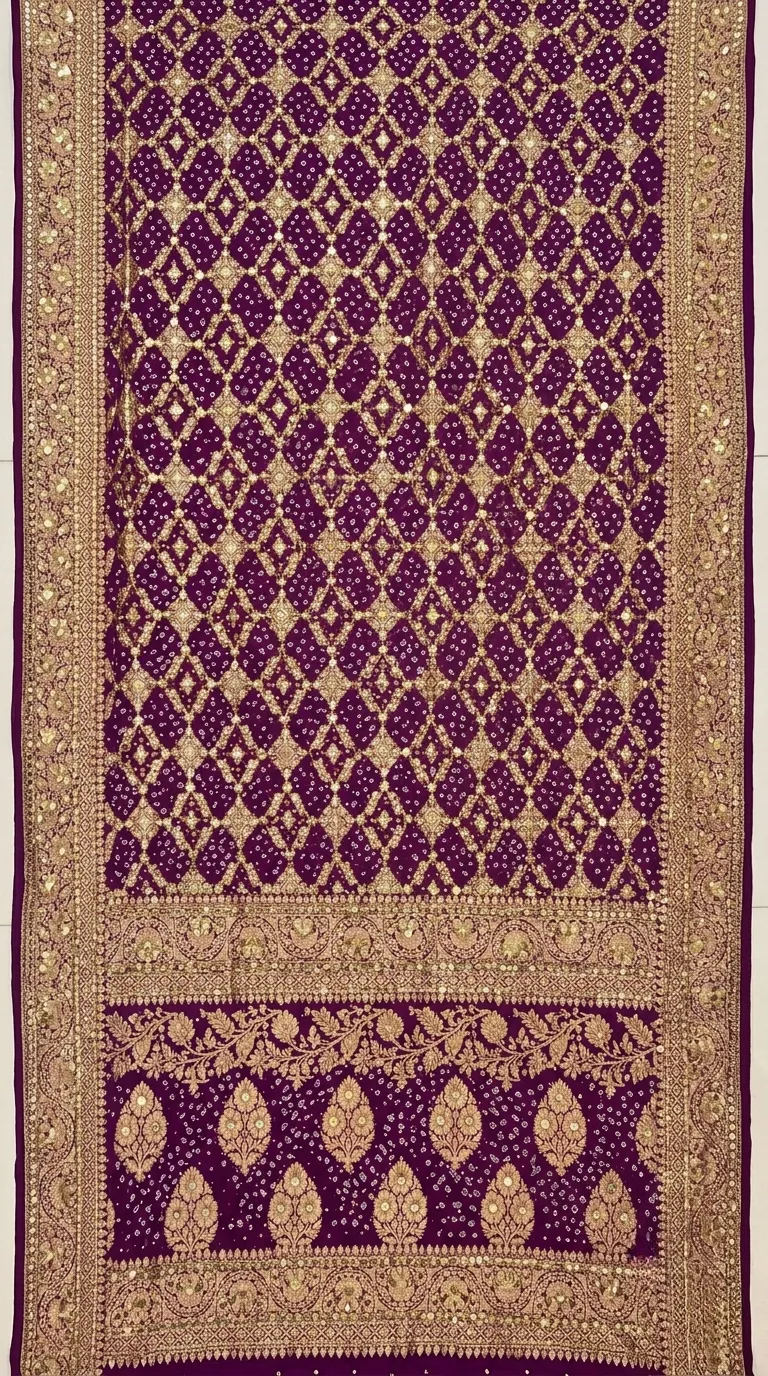 Flat photo you upload
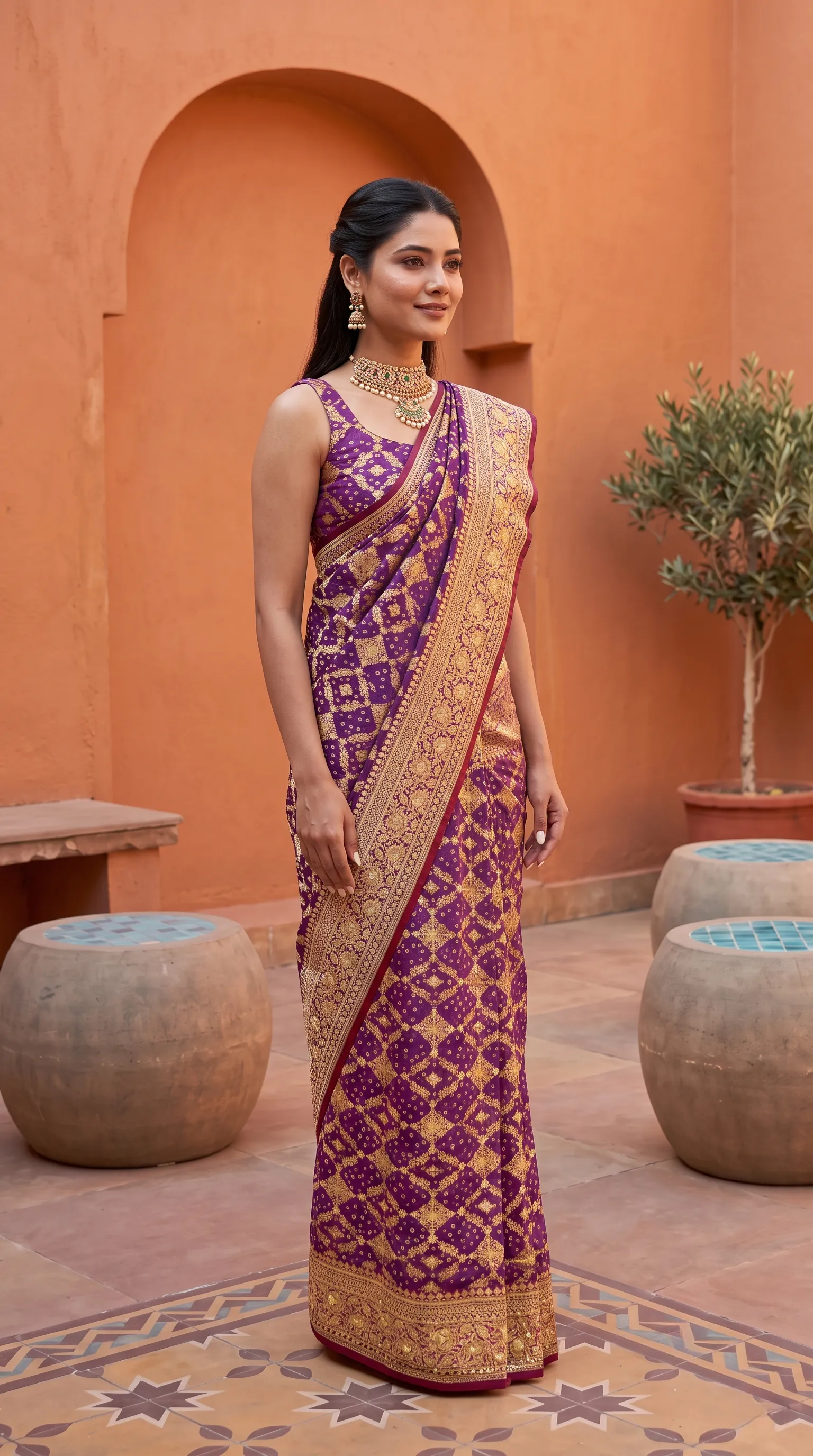 Draped on a model
The left photo is the saree laid flat, the way a seller shoots it. The right photo is the saree draped on a model by Drape Studio. Look at where the border and the pallu land.
How Drape Studio works, step by step
You start with one flat photo of the saree, body and pallu together, shot straight-on in even light. Use your original product photo, not an earlier AI image. Everything after that is a set of choices you make and can see.
- Upload the saree
One photo of the full saree. A phone photo on a clean floor is enough. JPG, PNG, WebP and most phone formats work.
- The studio finds the cloth
It detects the edges of the fabric and straightens it. If the outline is slightly off, drag the corners until it fits, then press Use this cut.
- Mark the pallu
Say whether the pallu is at the top or the bottom of your photo, then drag the line to where it starts. This is what puts the pallu design over the shoulder and not on the pleats.
- Mark the pattern repeat
One line marks a single repeat of the body pattern, so the design runs naturally across the whole saree instead of being stretched or copied at random.
- Add the blouse and close-ups if you have them
A blouse piece, and close-ups of zari, lace or border, help the fine detail come out right. They are optional.
- Watch the live drape preview
Your fabric is draped on a body and updates as you edit. This is what the AI works from, so you can catch a wrong cut or a misplaced pallu before you spend anything.
- Choose the drape, the model and the background
Pick a drape style, then a model, background, jewellery, hairstyle and makeup. Or leave them empty and Vastralook chooses what suits the saree.
- Order and download
Pick the order type and the size, then download with or without your logo. Marketplace presets set the background and size for Myntra, Amazon, Flipkart and Meesho.
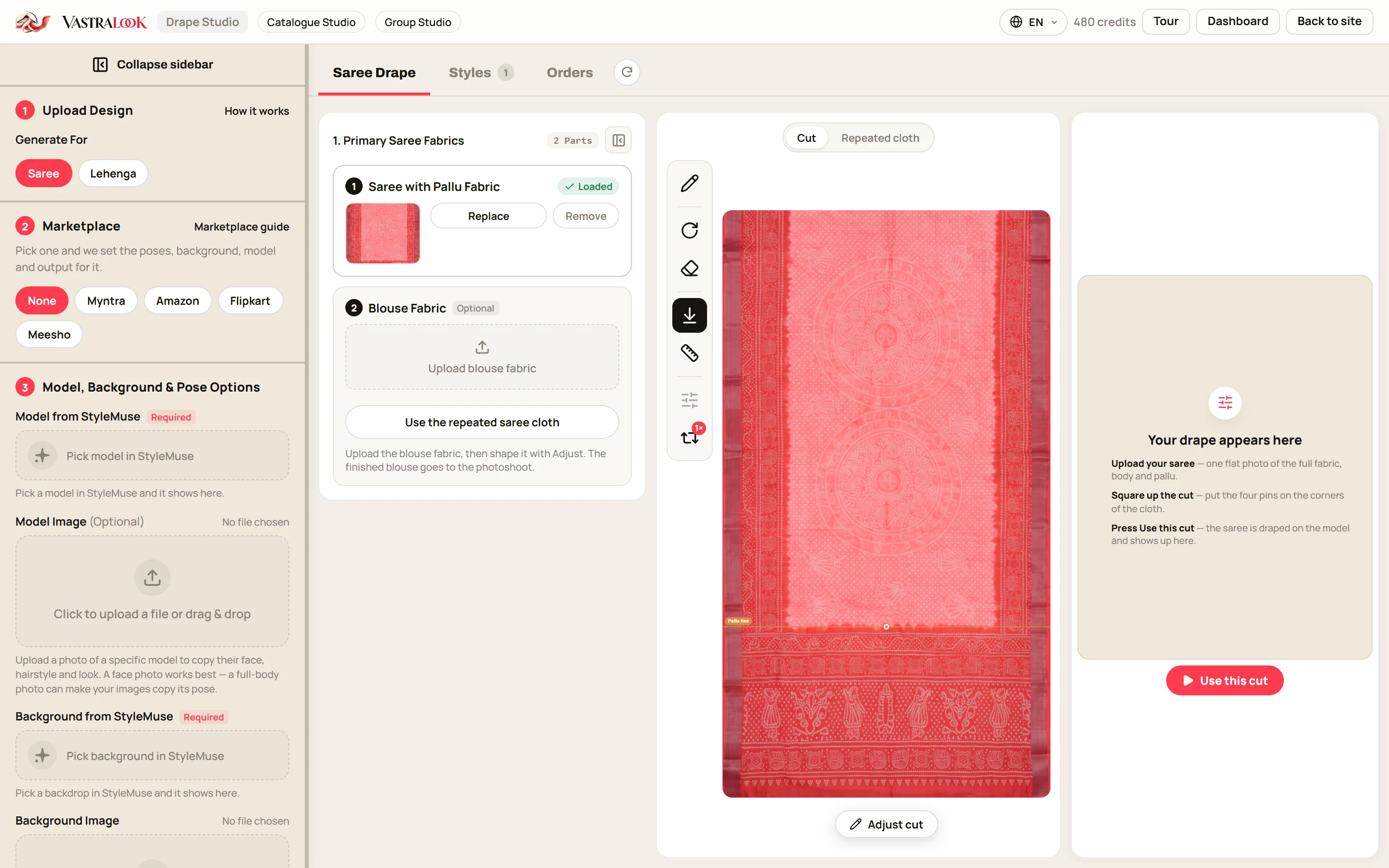
The three controls that make a saree look right
A saree goes wrong in predictable places, so those are the places Drape Studio hands to you. The cut decides which part of your photo is cloth and which is background. The pallu line decides where the pallu begins, so a heavy pallu design does not end up across the pleats. The pattern repeat tells the studio how large one motif is, so a small butti stays small and a large paisley stays large.
If you want the detail on the one that matters most, the pallu line guide walks through it with screenshots, including the three mistakes that ruin a drape.
Why not just ask a general image tool for a saree photo?
That is the whole idea. Your saree photo is the reference, so the border, the print and the colours come from your cloth rather than from a description. We do not invent a new design.
What you get for your money
A Create order shot costs from ₹7 at 1K and from ₹10 at 2K, depending on the credit pack you buy from, and a Budget order usually takes 4–5 minutes. Compare that with booking a model, a drape artist and a studio for each design. Pricing, plans and packs are on the pricing page, and the figures there are always current.
Your shots stay in Orders for you to download. You own your images and can use them commercially: on your store, your marketplace listings, ads and social media. If you are registered for GST, you can add your GSTIN at checkout and get a business invoice.
Who it helps
- Wholesalers and boutiques with many new designs a season and no time for a draped shoot each.
- Weavers and small sellers who sell by photo and cannot afford a model and a drape artist.
- Agencies who shoot sarees for several clients and want the same look across every design.
- Anyone with a back catalogue of flat photos who wants it to look as current as the new stock.
Before you start: the photos that help
- One flat photo of the whole saree, straight-on, with the pallu in view.
- Even daylight and a plain floor, so shadows do not become part of the design.
- Your original product photo, never an earlier AI image.
- Optional: the blouse piece, and one close-up each of zari, lace or border.
- Do not upload five photos of the same print. One fabric photo plus only the parts that are different works better.
Does Drape Studio keep my saree's design?
Your own saree photo is the reference, so the print, border and colours come from your cloth. Vastralook is built to keep them and matches your saree as closely as it can. AI output is not exact, so check the border and the pallu on each shot.
What photo works well?
One flat photo of the whole saree, body and pallu, shot straight-on in even light on a plain floor. Use your original product photo.
Can I add my blouse?
Yes. Upload the blouse piece and the studio uses it. Without it, the blouse is taken from the saree photo.
What if the pallu lands in the wrong place?
Check that you chose top or bottom correctly for the pallu in your photo, and that the pallu line sits where the pallu starts. Then Recreate the shot.
Will the pleats match the preview exactly?
Not always. The final photo drapes naturally, so the exact pleat count and fall can differ from the preview. The preview shows what the studio works from, not a promise of every fold.
Does it work for other draped garments?
Drape Studio is built for sarees. For kurtis, lehengas, dresses and everything else, use Catalogue Studio.
Who owns the photos?
You do. Everything you generate is yours to use commercially, in your store, ads and social media.
What if a shot misses?
Look at each shot before you list it. You can Recreate it, or ask for half the credits back on a paid shot that missed. The team reviews each request.


